

Table of Contents
- Key Takeaways
- Histogram Basics for Amateur Photographers
- Comparing RGB and Luminance Histograms
- How to Read and Interpret a Histogram
- Using Histograms for Better Exposure Control
- Common Histogram Mistakes to Avoid
- Unlock the Full Potential of Your Camera’s Histogram for Perfect Exposure
- Frequently Asked Questions
- Recommended
This blog post may contain affiliate links. As an Amazon Associate I earn from qualifying purchases.
Many beginner photographers find exposure confusing when chasing perfect shots across city streets or vibrant local parks. Without clear feedback, it is easy to lose detail in shadows or highlights, resulting in disappointing images during editing. Learning the basics of a histogram gives you a reliable visual guide to check your photograph’s tonal range before and after pressing the shutter. This introduction breaks down how histograms work, helping you build confidence in exposure control and image editing from the start.
Key Takeaways
| Point | Details |
|---|---|
| Understanding Histograms | Histograms are essential for evaluating image exposure and tonal distribution, aiding photographers in achieving optimal results. |
| Tonal Regions | Analyzing tonal regions helps in identifying underexposure, overexposure, and achieving a balanced exposure across shadows, midtones, and highlights. |
| Types of Histograms | RGB histograms provide detailed color channel information, while luminance histograms simplify the analysis to overall brightness, both being crucial for exposure control. |
| Common Mistakes | Photographers should avoid misinterpretation of histogram data and ensure visual verification to enhance their understanding of exposure dynamics. |
Histogram Basics for Amateur Photographers
A histogram is a powerful visual tool that helps photographers understand image exposure and tonal distribution. Think of it like a digital light meter that reveals precisely how light and dark pixels are spread across your photograph. Camera settings checklist for beginners become significantly more effective when you understand how to read and interpret these graphical representations.
Histograms translate complex pixel data into an easy-to-understand graph with two primary axes:
- X-axis: Represents tonal ranges from pure black (left) to pure white (right)
- Y-axis: Shows the number of pixels at each tonal level
- Dark pixels cluster on the left side
- Bright pixels cluster on the right side
- Midtone pixels appear in the center regions
Understanding histogram fundamentals allows amateur photographers to make precise exposure adjustments before and after capturing an image. By analyzing the graph, you can quickly determine whether your photo is under-exposed (too dark), over-exposed (too bright), or perfectly balanced.
A well-balanced histogram typically shows data distributed across the entire width, without significant spikes at extreme left or right edges.
For practical application, photographers should learn to read histograms in three key tonal regions: shadows (left third), midtones (center), and highlights (right third). Each region provides critical information about image brightness and potential detail loss.

For a quick reference, here is a summary of the three main histogram tonal regions and their photographic significance:
| Tonal Region | Typical Placement | Photographic Impact |
|---|---|---|
| Shadows | Left third | Reveals dark details, risk of underexposure |
| Midtones | Center | Balanced exposure, overall image clarity |
| Highlights | Right third | Shows bright details, risk of overexposure |
Pro tip: Practice reading histograms in different lighting conditions to develop an intuitive understanding of how tonal distributions change with various scenes and camera settings.
Comparing RGB and Luminance Histograms
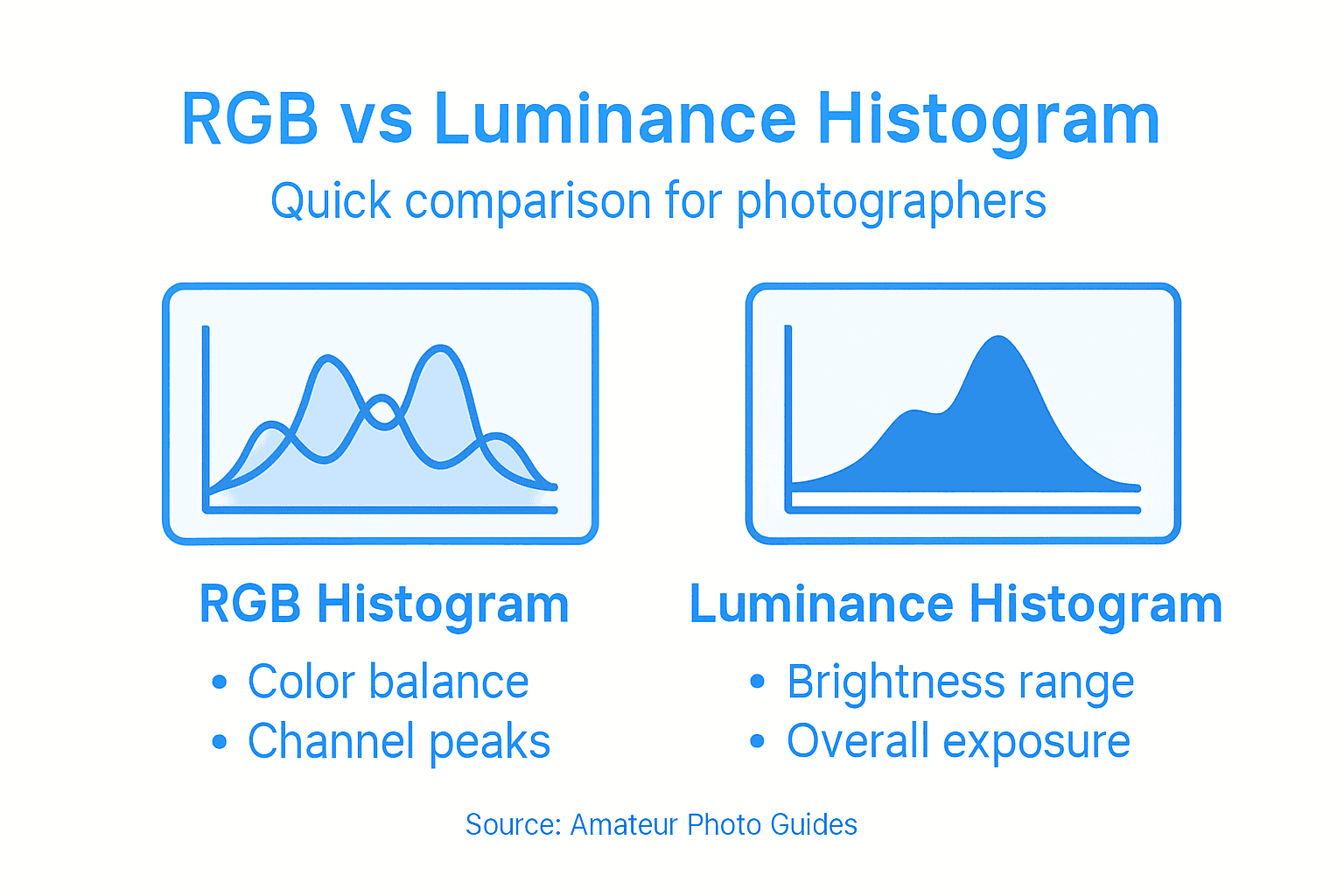
RGB histograms and luminance histograms represent two distinct approaches to visualizing image exposure, each offering unique insights for photographers. While both tools help analyze image tonal distribution, they provide different perspectives on how light and color interact in a photograph. The Beginner’s No-Fear Guide to Basic Camera Settings can further illuminate these technical nuances for amateur photographers.
RGB histograms break down color information across three distinct channels:
- Red channel: Shows the distribution of red pixel intensities
- Green channel: Displays green pixel intensity variations
- Blue channel: Reveals blue pixel intensity spread
- Each channel ranges from 0 (no intensity) to 255 (maximum intensity)
In contrast, luminance histograms aggregate these color channels into a single representation of perceived brightness. This simplified view helps photographers quickly assess overall image exposure without getting lost in color channel complexities.
A luminance histogram provides a simplified snapshot of image brightness, while RGB histograms offer granular color channel details.
Photographers can leverage both histogram types strategically. RGB histograms prove especially useful when precise color balance matters, such as in product, fashion, or landscape photography. Luminance histograms shine in scenarios where overall light distribution is the primary concern, like in portrait or documentary photography.
Here’s how RGB and luminance histograms differ in practical photographic use:
| Aspect | RGB Histogram | Luminance Histogram |
|---|---|---|
| Data Shown | Separate color channels | Aggregate brightness info |
| Use Case | Color accuracy focus | Overall exposure assessment |
| Key Advantage | Granular color insight | Quick exposure diagnosis |
| Limitation | Complex interpretation | Less color detail |
Pro tip: Practice reading both RGB and luminance histograms side by side to develop a comprehensive understanding of how color and brightness interact in your images.
How to Read and Interpret a Histogram
Reading a histogram might seem intimidating, but it’s essentially a visual roadmap to understanding your image’s exposure and tonal distribution. 7 Essential Steps in a Camera Settings Checklist for Beginners can complement this skill by helping you master foundational photography techniques. The histogram transforms complex pixel data into an easy-to-read graph that reveals critical information about your photograph’s light and dark areas.
Understanding histogram interpretation involves analyzing key areas of the graph:
- Left side: Represents shadows and dark tones
- Center: Shows midtones and balanced exposure
- Right side: Indicates highlights and bright areas
- Vertical axis: Represents the number of pixels at each tonal level
- Horizontal axis: Displays tonal ranges from pure black to pure white
Photographers can quickly diagnose exposure issues by observing histogram characteristics. An ideal histogram typically displays a balanced distribution across the graph, without significant spikes at extreme left or right edges. Extreme clustering indicates potential exposure problems that might result in lost image details.
A well-balanced histogram suggests your image captures detail across multiple tonal ranges, preventing significant shadow or highlight loss.
Different photographic scenarios require nuanced histogram reading. Landscape photographers might prefer a histogram with data spread across the entire width, while low-key or high-key photography intentionally pushes tonal data toward darker or lighter regions. Understanding these variations helps photographers make informed exposure decisions before and during image capture.
Pro tip: Enable your camera’s histogram display and practice analyzing it in various lighting conditions to develop an intuitive understanding of exposure dynamics.
Using Histograms for Better Exposure Control
Mastering exposure control requires more than intuition—it demands precise understanding of your camera’s histogram. The Beginner’s No-Fear Guide to Basic Camera Settings provides foundational insights, but histograms offer real-time visual feedback about your image’s tonal distribution and potential exposure challenges.
Photographers can use histograms to make critical exposure adjustments through several strategic methods:
- Highlight Recovery: Watch for right-side graph spikes indicating potential overexposure
- Shadow Detail: Check left-side clustering to prevent losing dark image information
- Midtone Balance: Ensure a smooth distribution across the graph’s central region
- Dynamic Range Management: Understand how different scenes impact tonal distribution
- Exposure Compensation: Use histogram insights to make precise camera setting adjustments
Different photographic scenarios demand unique histogram reading strategies. A landscape photograph might require a broad, even distribution, while a high-contrast portrait could intentionally push tonal data toward specific regions. Understanding these nuanced approaches helps photographers make informed exposure decisions in real-time.
Effective histogram reading transforms your camera from an automatic shooting device into a precision exposure control tool.
Professional photographers treat the histogram as a critical diagnostic tool, using it to anticipate potential image quality issues before pressing the shutter. By developing a keen eye for tonal distribution, you can consistently capture images with optimal exposure and minimal post-processing corrections.
Pro tip: Enable histogram display on your camera and practice reading it in various lighting conditions to develop an intuitive understanding of exposure dynamics.
Common Histogram Mistakes to Avoid
Understanding histogram pitfalls is crucial for photographers seeking accurate exposure control. 7 Essential Steps in a Camera Settings Checklist for Beginners highlights the importance of technical precision, and recognizing common histogram mistakes can dramatically improve your photographic skills.
Photographers frequently stumble into several critical histogram interpretation errors:
- Absolute Interpretation: Assuming all histogram spikes are bad
- LCD Deception: Trusting camera screen brightness over histogram data
- Ignoring Color Channels: Overlooking individual RGB channel distributions
- One-Size-Fits-All Approach: Expecting identical histogram shapes across different scenes
- Neglecting Visual Verification: Relying exclusively on histogram without visual assessment
Each photographic scenario demands a nuanced approach to histogram reading. What appears as an exposure mistake in one context might be a deliberate artistic choice in another. For instance, high-contrast scenes naturally produce histograms with more extreme tonal distributions, which doesn’t necessarily indicate poor exposure.
Not all histogram spikes represent errors—some represent intentional creative choices in image composition.
Professional photographers develop histogram literacy by understanding that these graphs are diagnostic tools, not absolute rules. They learn to read histograms contextually, combining technical analysis with creative intent. This approach transforms histogram reading from a mechanical task to an intuitive skill that enhances photographic vision.
Pro tip: Practice reading histograms across diverse shooting scenarios to develop a nuanced understanding of how different subjects and lighting conditions impact tonal distribution.
Unlock the Full Potential of Your Camera’s Histogram for Perfect Exposure
Understanding the histogram is essential to mastering exposure control and capturing images with impressive detail and balance. If you often struggle with underexposed or overexposed photos, or if reading your camera’s histogram feels confusing, you are not alone. This article breaks down critical concepts like shadows, midtones, highlights, RGB and luminance histograms, and common mistakes that amateur photographers make.

Discover how to turn histogram data into actionable insights and make smarter adjustments when shooting. Visit Amateur Photographer Guide for practical tutorials and expert advice focused on photography basics and 7 Essential Steps in a Camera Settings Checklist for Beginners. Start developing your histogram literacy today and take confident control over your exposure settings. Your journey to capturing perfectly balanced photos begins with informed decisions that you can learn right now at Amateur Photographer Guide.
Frequently Asked Questions
What is a histogram in photography?
A histogram is a visual tool that represents the tonal distribution of an image, showing how light and dark pixels are spread from pure black to pure white.
How do I read a histogram?
To read a histogram, observe the left side for shadows, the center for midtones, and the right side for highlights. The vertical axis indicates the number of pixels at each tonal level.
Why is understanding histograms important for exposure control?
Understanding histograms helps photographers make precise exposure adjustments, allowing them to avoid underexposure and overexposure, resulting in better images.
What are the differences between RGB and luminance histograms?
RGB histograms display the intensity of red, green, and blue channels separately, while luminance histograms represent overall perceived brightness, simplifying exposure assessments.
