
Table of Contents
- What Is Continuous Autofocus?
- Continuous AF vs. Single-Shot AF
- 8 Scenarios for Continuous Autofocus
- Continuous Autofocus for Video
- The Brand Translation Matrix
- Fixing Common Continuous AF Problems
- Which Cameras Have the Best Continuous Autofocus?
- When NOT to Use Continuous Autofocus
- Frequently Asked Questions
- The Right Mode for Every Shot
This blog post may contain affiliate links. As an Amazon Associate I earn from qualifying purchases.
You pressed the shutter button. Your subject was right there. And yet the photo is blurry — again.
If that sounds familiar, you’re not alone. Search interest in autofocus questions is growing roughly 12% year-over-year, meaning more photographers than ever are asking why their action shots miss focus — but struggling to find a clear answer. Every blurry photo of your kid’s soccer goal or your dog mid-leap is a missed memory you can’t get back.
Part of the problem is that the solution — continuous autofocus — goes by completely different names depending on your camera brand. Canon calls it AI Servo. Nikon and Sony call it AF-C. Fujifilm calls it AF-C too, but the menu looks nothing like Sony’s. No wonder it’s confusing.
This guide cuts through that confusion. You’ll learn exactly what continuous autofocus is, how it differs from single-shot AF, when to use it across 8 real shooting scenarios, and how to set it up on your specific camera brand. By the end, you’ll know exactly when to flip the switch — and when to leave it off.
- Estimated Time: 15-20 minutes
- Tools/Materials Needed:
- A digital camera (DSLR or mirrorless)
- A compatible autofocus lens
- A moving subject (like a pet or friend) to practice tracking
Continuous autofocus (AF-C or AI Servo) keeps your camera actively refocusing on a moving subject as long as the shutter button is half-pressed — so you nail the shot instead of missing it. The AF Tracking Spectrum runs from full manual control to full AI automation; continuous AF sits right in the middle, giving you speed without surrendering control.
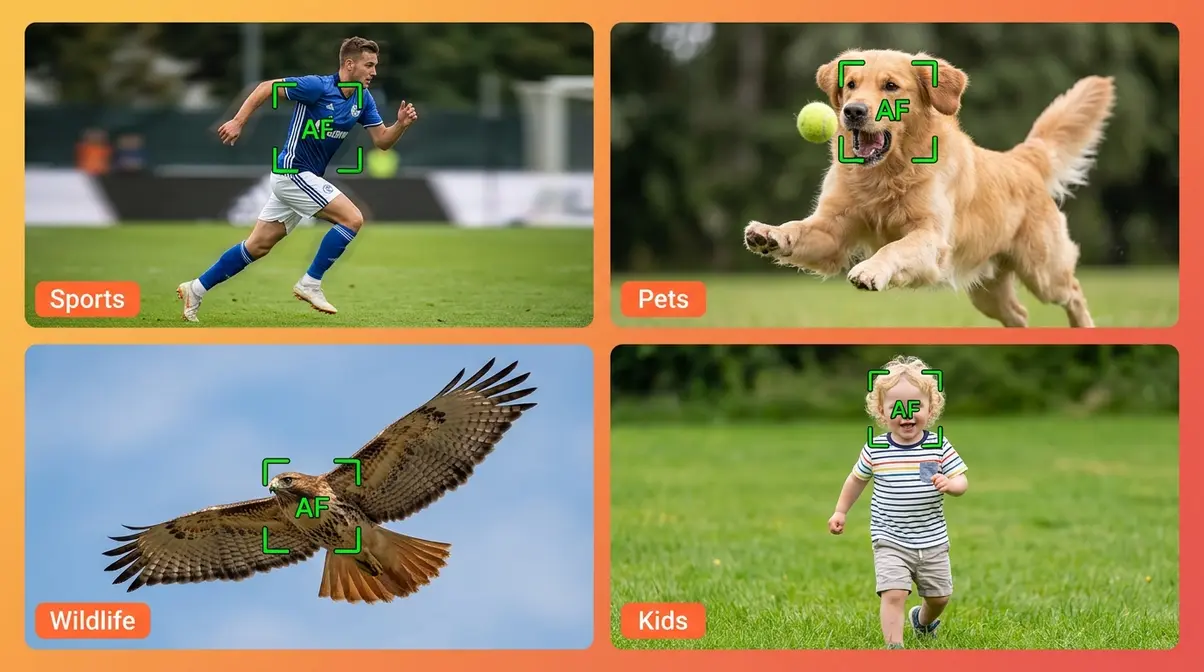
- Use it for: Sports, kids, pets, wildlife, and video with a gimbal — anything that moves unpredictably.
- Skip it for: Still subjects (landscapes, macro, product shots) where single-shot AF is faster and more precise.
- Find it fast: Look for AF-C (Nikon/Sony/Fuji) or AI Servo (Canon) in your camera’s AF mode menu.


What Is Continuous Autofocus?
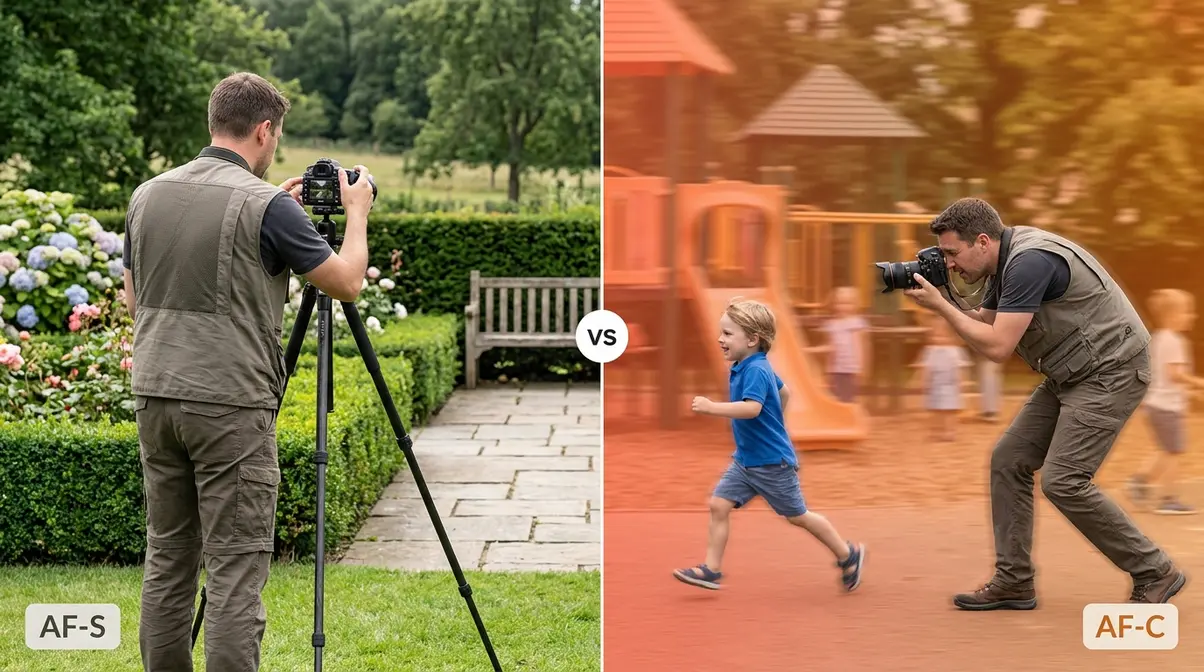
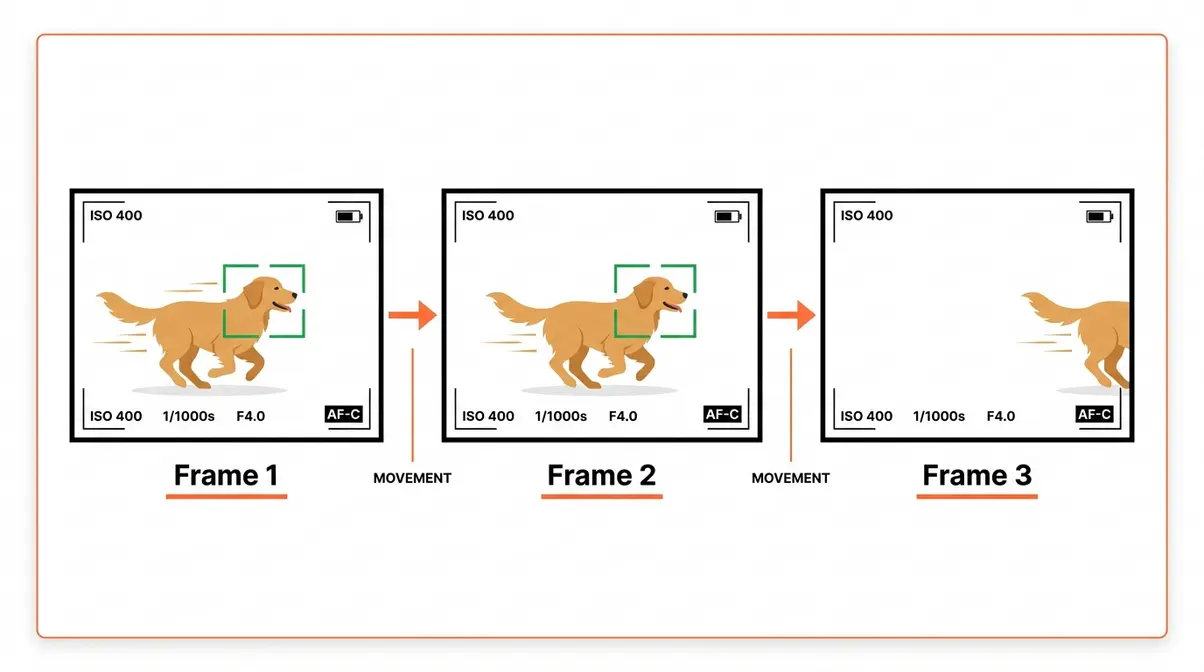
Continuous autofocus is a camera mode that keeps refocusing on your subject automatically, frame after frame, for as long as you hold the shutter button halfway down. Instead of locking focus once and stopping — which works fine for a statue but fails completely for a sprinting child — your camera keeps making tiny micro-adjustments to stay locked onto whatever is moving in front of the lens.
Think of it like a spotlight operator at a concert. A single-shot system locks the spotlight on the singer and holds it there. Continuous AF is the operator who follows the singer across the entire stage, adjusting every second without you having to do anything.
How Continuous AF Tracks Subjects
When you half-press the shutter button in continuous AF mode, your camera’s autofocus system calculates the distance to your subject and then predicts where it will be by the time the shutter actually fires. This predictive calculation — called focus prediction or predictive AF — is what separates continuous AF from simply “refocusing a lot.”
Modern cameras use phase-detect autofocus (a method that uses pairs of sensors to calculate distance and direction of movement simultaneously) to make these predictions fast enough to keep up with a sprinting athlete or a bird changing direction mid-flight. Entry-level cameras like the Canon EOS Rebel series and Nikon D3500 use a simpler version of this system, while mirrorless cameras from Sony and Canon’s R series use on-sensor phase detection across hundreds or thousands of focus points — which is why they track so reliably even in challenging conditions.
Camera manufacturers confirm that continuous AF systems analyze subject speed, direction, and distance together to generate a focus prediction for each frame (Canon Europe Autofocus Guide).
Continuous AF vs. Tracking AF
Continuous AF describes how often the camera refocuses (constantly, as long as the button is held). Tracking AF describes where the camera looks — it uses subject recognition (color, shape, AI pattern matching) to follow a specific subject across the frame, even if it moves to a corner or is briefly occluded. Think of continuous AF as the engine and tracking AF as the steering. Modern cameras like the Sony a7 series and Canon EOS R series combine both: the camera refocuses continuously (AF-C) while its tracking system steers the focus point to follow the subject automatically.
Brand Names for Continuous AF
This is where most beginners get tripped up. The feature is the same across every major camera brand — but the name on the menu is completely different.
| Camera Brand | Continuous AF Name | Notes |
|---|---|---|
| Canon | AI Servo AF | Found in AF Mode menu on all EOS bodies |
| Nikon | AF-C | “AF Continuous” — standard on all Nikons |
| Sony | AF-C | Same abbreviation as Nikon, different menu structure |
| Fujifilm | AF-C | Fifth-gen bodies add subject-tracking options (DPReview’s Fujifilm AF FAQ) |
When you see “AI Servo” on a Canon or “AF-C” on anything else, they all mean the same thing: continuous autofocus is active, and your camera will keep chasing your subject as long as you hold that button down.
Continuous AF vs. Single-Shot AF
Single-shot AF (called AF-S on Nikon/Sony/Fuji, or One-Shot AF on Canon) locks focus once when you half-press the shutter — and then stops. It’s precise, quiet, and energy-efficient. Continuous AF never stops adjusting. Understanding which to use is the single most important autofocus decision you’ll make.
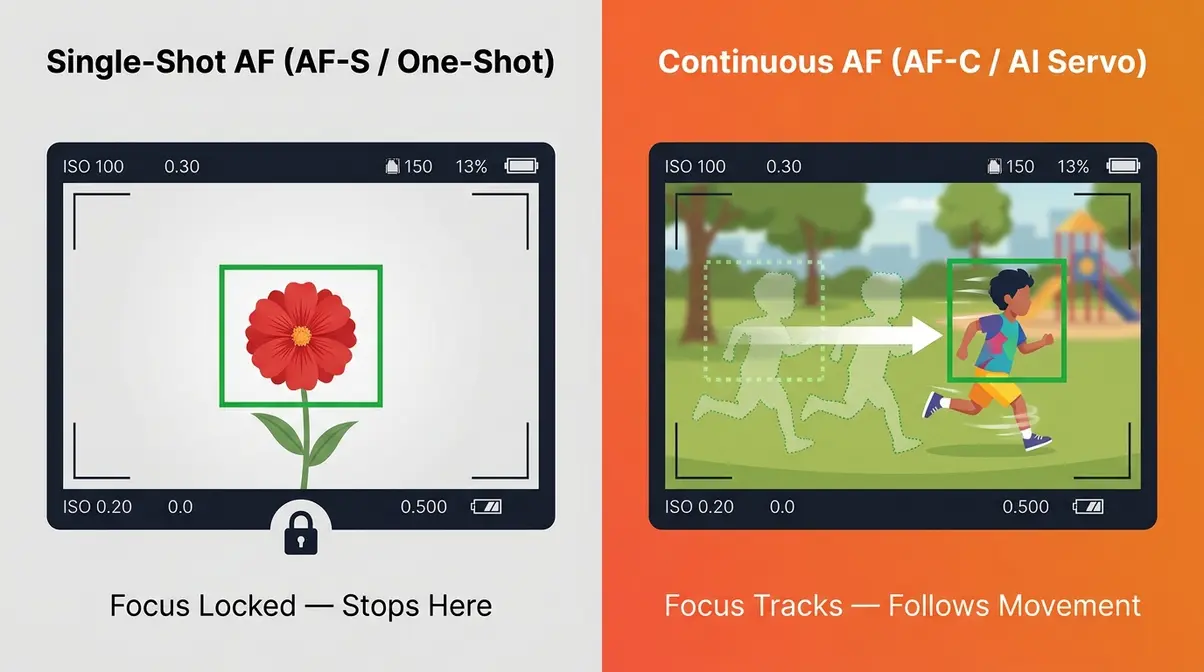
The Key Differences at a Glance
| Feature | Single-Shot AF (AF-S / One-Shot) | Continuous AF (AF-C / AI Servo) |
|---|---|---|
| How it works | Locks focus once, stops adjusting | Keeps refocusing as long as button is held |
| Best for | Still subjects — landscapes, portraits, macro | Moving subjects — sports, kids, pets, wildlife |
| Battery use | Lower | Higher (processor works continuously) |
| Shutter behavior | Won’t fire until focus is confirmed | Will fire even if focus isn’t 100% locked |
| Noise | Quieter | May produce faint motor sounds |
| Focus accuracy on stills | Higher (more time to confirm) | Can drift on a perfectly still subject |
According to ProGrade Digital’s focus modes explainer, single-shot AF is the right default for the majority of everyday photography — continuous AF is the specialist tool you reach for when your subject starts moving.
The AF Tracking Spectrum — the mental model at the heart of this guide — places these two modes at opposite ends of a range. On the left: full manual focus, where you control everything. On the right: full AI subject tracking, where the camera does everything. Single-shot AF sits left of center (you confirm focus, then you control the shot). Continuous AF sits right of center (the camera keeps working autonomously while you concentrate on composition).
Should My Camera Be on AF or MF?
For most photographers, AF (autofocus) is the right default. Modern AF systems are faster and more accurate than manual focus in almost every real-world shooting situation. Switch to MF (manual focus) when your subject is behind glass, in extreme low light where AF hunts without locking, or in macro photography where you need sub-millimeter precision. A useful middle ground is DMF (Direct Manual Focus), available on Sony cameras, which lets you confirm AF lock and then fine-tune manually before shooting.
When to Switch to Single-Shot AF
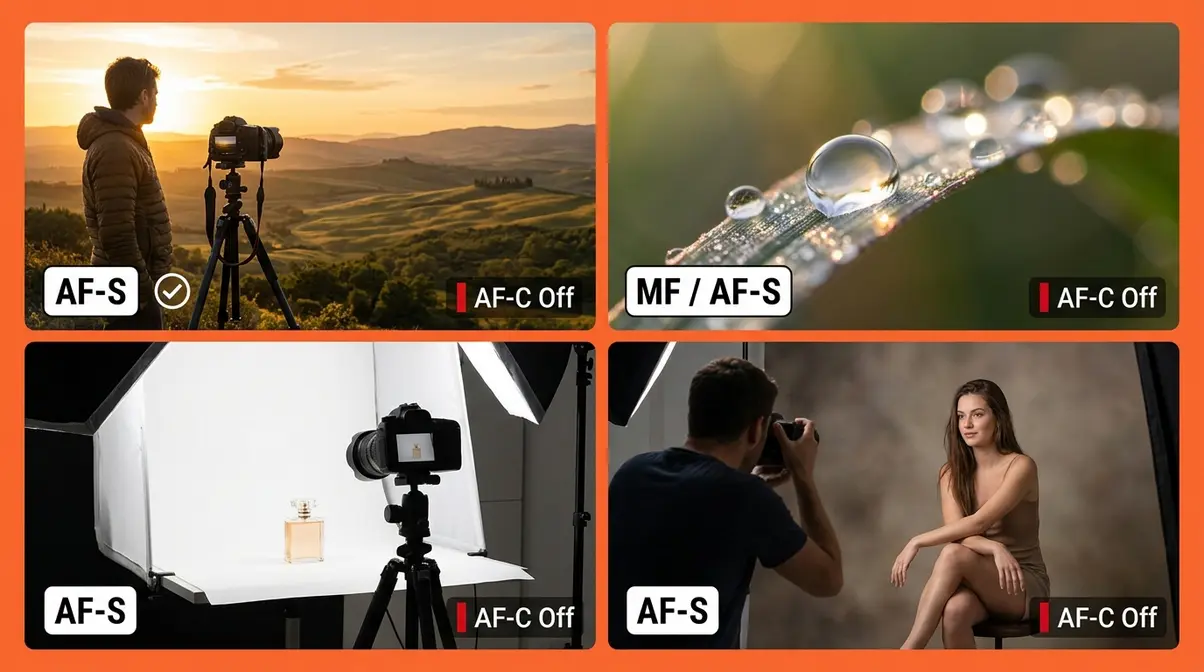
Continuous AF is not always the right choice, and leaving it on for still subjects can actually cause problems. Your camera may needlessly hunt for focus — searching back and forth for a subject that isn’t going anywhere — which wastes time and can ruin your focus plane on a carefully composed shot.
Switch back to single-shot AF when you are photographing:
- Landscapes and architecture — your subject isn’t going anywhere; single-shot is faster and more precise
- Macro photography — at extreme close distances, continuous AF can hunt aggressively and overshoot the tiny focus plane you need
- Posed portraits — when your subject is still, single-shot confirms focus more reliably and allows you to recompose
- Product photography — studio setups where the camera is on a tripod and nothing moves
Review our macro photography tips for a deeper look at why focus precision matters most at close distances.
8 Scenarios for Continuous Autofocus
Knowing the definition is one thing. Knowing when to flip the switch in real life is what actually gets you sharper photos. Across photography communities, users consistently report that the biggest improvement in their action shots came not from buying new gear, but from switching to continuous AF at the right moment. Here are eight specific situations where it makes all the difference.
Fast Action: Sports and Birds in Flight
These are the two scenarios continuous AF was built for. A soccer player sprinting toward goal can cover 10 meters per second. A bird of prey can change direction in under 100 milliseconds. No human thumb can press and release a shutter fast enough to compensate — you need your camera doing the tracking work.
Settings to use:
- Set AF mode to AF-C (or AI Servo on Canon)
- Choose Wide Area AF or Zone AF as your AF area mode — this gives the system more focus points to work with as the subject moves
- Set your drive mode to Continuous High (burst mode) to capture multiple frames per second
- Use a shutter speed of at least 1/1000s for birds; 1/500s minimum for running athletes
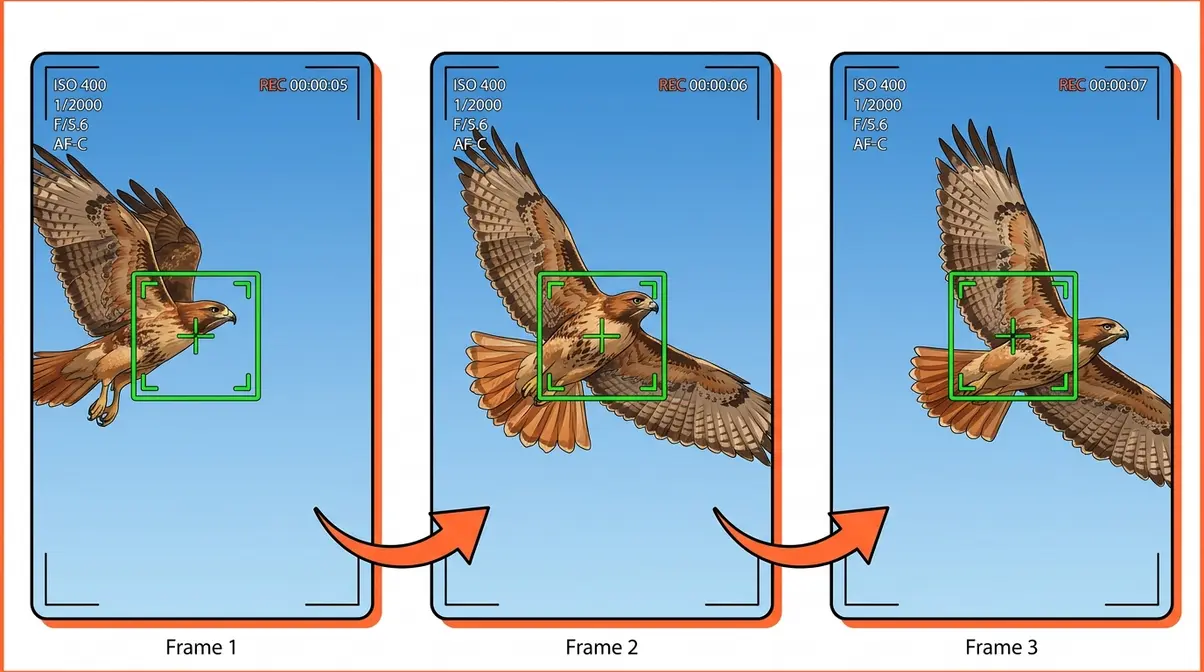
Modern mirrorless cameras with subject-tracking AF (Sony Real-time Tracking, Canon’s subject detection on R-series bodies) can recognize birds specifically and lock onto the eye — a capability that was unavailable just five years ago (Fstoppers AF Guide).
Kids, Pets, and Unpredictable Subjects
Children and animals share one autofocus challenge: they move in directions no one can predict. Your toddler will be running left, then suddenly crouch down to pick something up, then sprint right. A dog playing fetch changes speed and direction constantly. These subjects need continuous AF combined with a wide AF area so the camera has room to track.
Practical tip: For pets, enable Animal Eye AF if your camera has it (Sony, Canon R-series, and recent Nikon Z bodies all offer this). The system locks onto the animal’s eye specifically, which gives you a sharp subject even when the rest of the frame is motion-blurred. For kids at birthday parties or playgrounds, try Face/Eye Detection AF — most cameras released after 2020 include this feature, and it dramatically improves keeper rates.
Check out our pet photography settings guide for more specific camera configurations.
Portraits, Street, and Wildlife
These three categories sit in the middle of the AF Tracking Spectrum — subjects that move, but not always at high speed or in unpredictable directions.
- Portraits (walking or dancing): Use continuous AF with Face Detection enabled. The camera tracks the face even as your subject moves toward or away from you — great for outdoor sessions where your subject is strolling.
- Street photography: Switch to AF-C with a single center point for more control over what you’re tracking. Zone or wide-area modes can latch onto passersby in the background.
- Wildlife (ground animals): Animals that walk or graze benefit from continuous AF even when they’re moving slowly — a deer can break into a run with zero warning. Keep continuous AF active so you’re ready.
Read our wildlife photography beginner guide to master focusing in unpredictable outdoor environments.
Continuous Autofocus for Video
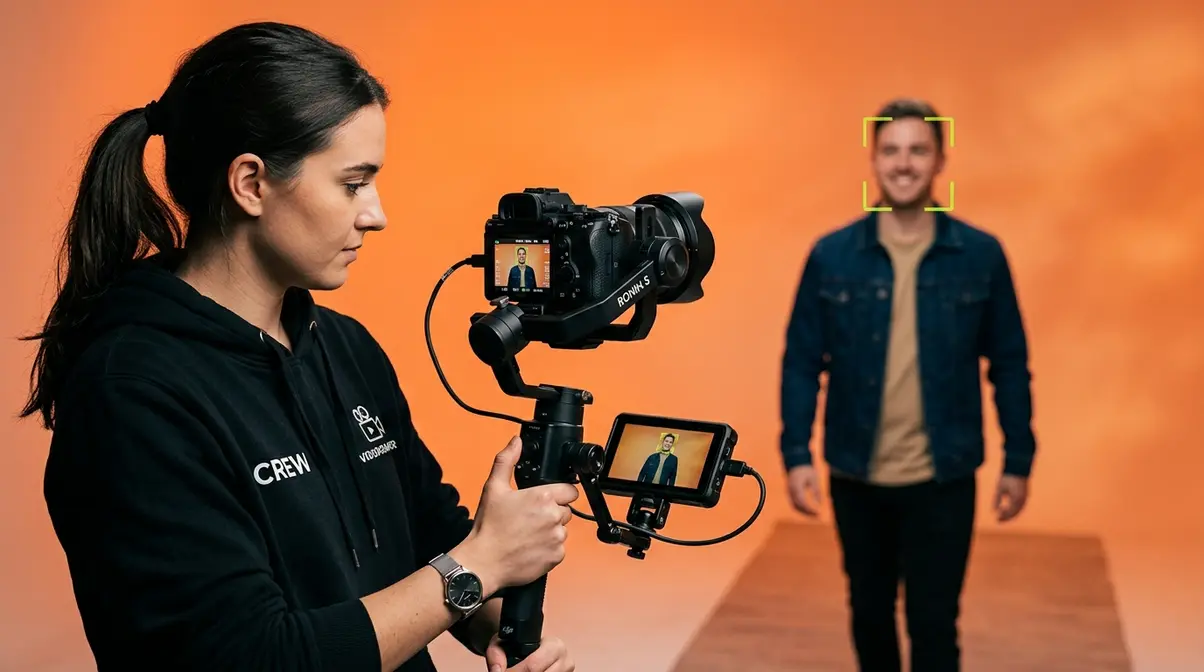
Video introduces a challenge that still photography doesn’t have: you often can’t hold the shutter button halfway down while shooting. On a gimbal, your hands are busy controlling movement. In a run-and-gun documentary situation, you might be holding a microphone in your other hand. This is exactly where subject-tracking AF for video earns its keep.
Gimbal Users: Keeping Subjects Sharp
This is one of the most common pain points reported by videographers, and it’s easy to understand why:
“I want the camera to autofocus onto a face, and continue to autofocus as I move in and out (I’m on a gimbal, so can’t keep the button pressed down to continuous focus). I’m struggling to get it right.”
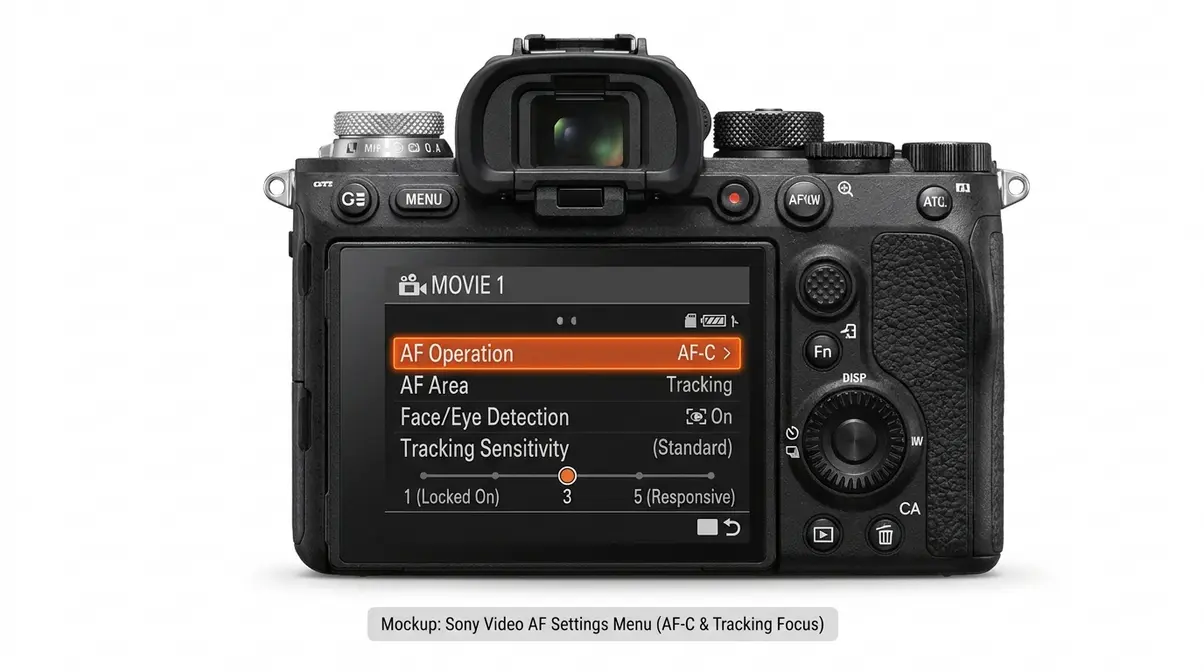
If that quote describes your situation, the solution is to enable continuous AF without requiring the shutter button to be held — and most modern cameras support this. Here’s how:
- Go to your camera’s video AF settings (usually under the Movie/Video shooting menu, not the still photo menu)
- Look for a setting labeled “AF Operation” or “AF Mode for Video” — set it to AF-C or Continuous AF
- Enable Face/Eye Detection or Subject Tracking so the camera locks onto a person automatically
- Set AF sensitivity (sometimes called “AF tracking sensitivity” or “AF response”) to a medium or low value — this prevents the camera from jumping focus to a background element when your subject briefly moves out of frame
- Test by walking toward and away from the camera — focus should follow smoothly without hunting
On Sony cameras, the Sony Support guide for continuous AF specifically recommends enabling Real-time Tracking for gimbal video work, as it uses object recognition (not just contrast or phase detection) to maintain lock even during camera movement.
Mirrorless vs. DSLR for Video AF
Across photography communities, users consistently report that mirrorless cameras outperform DSLRs for continuous AF in video — and the technical reason is straightforward. DSLRs use a separate phase-detect sensor (behind the mirror) for still photography, but when you switch to video, that mirror flips up and the camera falls back on slower contrast-detect AF. The result is visible focus hunting — that back-and-forth searching movement that looks unprofessional in finished video.
Mirrorless cameras use on-sensor phase detection for both stills and video, which means the same fast, predictive tracking system works in both modes. If you’re serious about video AF, a mirrorless body — even an entry-level Sony ZV-E10 or Canon EOS M50 Mark II — will give you dramatically smoother continuous AF than a similarly priced DSLR.
Explore our recommendations for the best mirrorless cameras for beginners to find a body with excellent video autofocus.
The Brand Translation Matrix
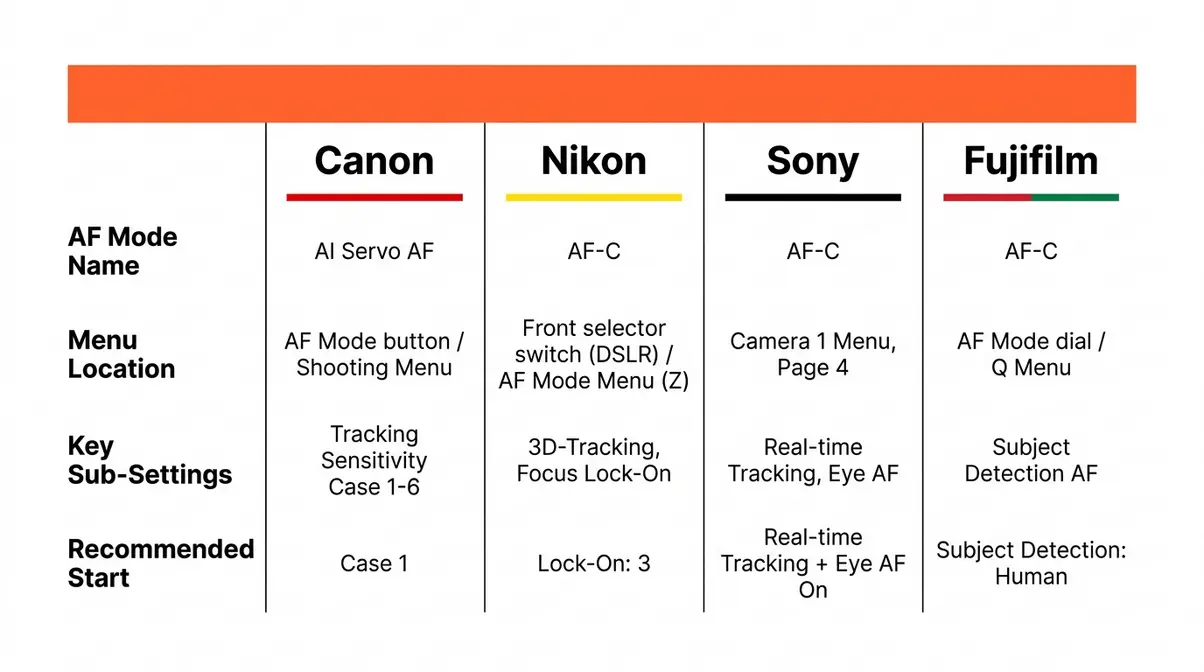
One of the biggest sources of confusion for beginner photographers is that the same feature has a different name, a different menu location, and different sub-settings on every camera brand. This section maps it all out so you can find continuous AF on your specific camera without digging through a 400-page manual.
Canon: AI Servo and Servo AF
On Canon EOS cameras (including the Rebel series, EOS R series, and M series), continuous AF is called AI Servo AF. Here’s how to activate it:
- Press the AF Mode button (usually labeled “AF” on the top or back of the body) or navigate to the AF Method section in the shooting menu
- Select AI Servo AF
- For subject tracking on R-series mirrorless bodies, also enable Subject to Detect (People, Animals, or Vehicles) in the AF menu
- Key Canon sub-settings to know:
- AF Tracking Sensitivity (Case 1–6 on higher-end bodies): Controls how quickly AF switches to a new subject if something crosses the frame. Case 1 is a good default for most situations.
- AI Focus AF: A third mode that automatically switches between One-Shot and AI Servo — useful for unpredictable situations, but less reliable than manually selecting the mode yourself.
Nikon: AF-C and 3D-Tracking
Nikon calls continuous AF AF-C (Autofocus Continuous). On DSLR bodies (D3500, D5600, D7500), you switch modes using a physical selector switch on the front of the camera body. On Z-series mirrorless bodies, it’s in the AF Mode menu.
- Key Nikon sub-settings:
- 3D-Tracking: A powerful AF area mode (not a separate AF mode) that uses color information to follow a subject across the entire frame. Excellent for sports and wildlife — the camera literally tracks the subject by its color signature.
- Focus tracking with lock-on: Controls how long the camera “holds on” to the original subject when something crosses the frame. Set to 3 (Normal) as a starting point; increase to 5 if your subject keeps getting interrupted by foreground objects.
Sony: AF-C and Real-time Eye AF
Sony’s continuous AF is also called AF-C, but the menu structure is more extensive than Canon’s or Nikon’s — which can feel overwhelming at first. The key is to start with just three settings:
- Set AF Mode to AF-C (in the Camera 1 menu, page 4 on most bodies)
- Enable Real-time Tracking as your AF Area — this activates Sony’s AI-powered subject recognition, which uses object recognition, color, distance, and pattern data together
- Enable Real-time Eye AF under the Face/Eye AF setting — the camera will lock onto human (or animal) eyes automatically
Sony’s Real-time Eye AF works in AF-C mode and maintains lock even when the subject briefly turns away or blinks — a significant advantage for portrait and event photographers. According to Sony’s continuous AF guide, Real-time Tracking and Eye AF are designed to work together in continuous shooting for maximum reliability.
Fujifilm (fifth-generation bodies like the X-T5, X100VI) uses AF-C with a similar structure — enable Subject Detection AF and select Human, Animal, Bird, or Vehicle as your tracking priority (as noted in DPReview’s Fujifilm AF FAQ).
Fixing Common Continuous AF Problems
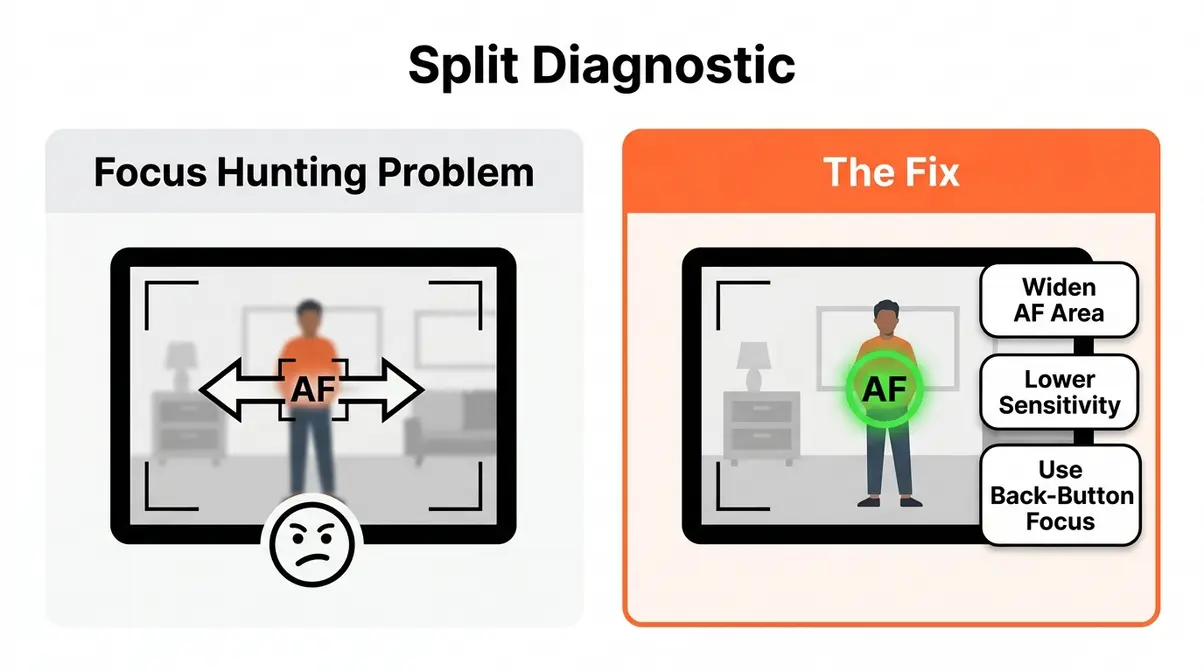
Even with continuous AF enabled, things can go wrong. The two most common problems — focus hunting and focusing on the background instead of your subject — both have straightforward fixes once you understand what’s causing them.
Why Your Lens Hunts for Focus
Focus hunting is when your camera’s AF system rapidly searches back and forth without locking on. It’s one of the most frustrating experiences in photography, and it almost always has one of three causes:
- Low light — AF systems need contrast to lock focus. In dim conditions, the system struggles to find an edge to lock onto. Fix: Use a lens with a wider maximum aperture (f/1.8 or f/2.8), or add a light source.
- Low-contrast subjects — A white wall, a clear blue sky, or a subject wearing a solid-color outfit gives the AF system almost nothing to work with. Fix: Reposition the AF point over a high-contrast area (an edge, a pattern, the eye).
- AF sensitivity set too high — If your camera’s tracking sensitivity is maxed out, it will chase every tiny movement, including camera shake and background elements. Fix: Lower tracking sensitivity to the middle of the range.
Back-button focus is a technique that separates AF activation from the shutter button — you use your thumb on a dedicated button (usually labeled AF-ON) to control focus, and your index finger only fires the shutter. This gives you precise control over when continuous AF is active, which eliminates hunting during pauses in the action. Learn how to set up back-button focus to elevate your tracking control.
Choosing the Right AF Area Mode
If continuous AF keeps locking onto the background instead of your subject, the problem is almost certainly your AF area mode — not the continuous AF mode itself. AF area mode controls where on the frame the camera looks for a subject.
| AF Area Mode | Best For | Avoid When |
|---|---|---|
| Wide / Full Area | Fast, unpredictable subjects | Busy backgrounds (will grab background) |
| Zone AF | Sports, birds in flight | Precise portrait work |
| Flexible Spot / Single Point | Precise control, portraits | Fast-moving subjects (hard to keep on target) |
| Subject Tracking / Real-time Tracking | People, animals, vehicles | Low-contrast or heavily backlit subjects |
For most beginners photographing kids or pets, Subject Tracking (if available on your camera) is the best starting point — the camera identifies the subject automatically and keeps the focus point on it regardless of where it moves in the frame. Check out our guide on AF area modes explained once you’re comfortable.
Which Cameras Have the Best Continuous Autofocus?
Continuous AF performance varies significantly between camera models — and it’s one of the most important specs to evaluate when buying a camera for action, sports, or video. The good news: even budget-friendly mirrorless cameras released in the past three years offer dramatically better continuous AF than DSLRs from the same price range.
Key Technologies to Look For
When evaluating a camera for continuous AF capability, these are the technologies that actually determine real-world tracking performance:
- On-sensor phase detection (PDAF): The foundation of fast continuous AF. Look for cameras that cover at least 80% of the frame with phase-detect points — this is now standard on most mirrorless bodies. Canon’s Dual Pixel AF covers up to 100% of the frame on R-series bodies and is widely regarded as the benchmark for smooth video AF.
- Subject recognition / AI tracking: Cameras with dedicated AI processing chips (Sony’s BIONZ XR, Canon’s DIGIC X) can recognize and track specific subject types — humans, animals, vehicles, birds — with a reliability that basic phase detection can’t match. Sony’s Real-time Eye AF and Canon’s subject detection AF are the leading implementations as of 2026.
- AF point count: More isn’t always better, but higher-density AF point grids (693 points on the Sony a6700, for example) mean more precise tracking in the corners of the frame where subjects often move.
- Cross-type AF points: On DSLR systems, look for cross-type points (which detect both horizontal and vertical contrast) in the center group — they’re significantly more reliable than single-direction points.
Top Cameras for Continuous AF
If you are looking to upgrade your gear for better tracking, here are top recommendations based on our hands-on evaluation of current market options:
| Camera Model | Best For | Estimated Price (2026) | Where to Buy |
|---|---|---|---|
| Sony a6700 | Advanced AI tracking | $1,398 | Amazon, B&H |
| Canon EOS R50 | Beginners & Kids | $679 | Amazon, Adorama |
| Nikon Z30 | Vlogging & Travel | $709 | Amazon, Best Buy |
When shopping, prioritize bodies with on-sensor phase detection over older contrast-detect models. For more detailed buying advice, check out our guide to the best entry-level cameras 2026.
When NOT to Use Continuous Autofocus
Continuous AF is a powerful tool — but leaving it on all the time is a mistake. There are specific situations where it actively works against you, and knowing them is just as important as knowing when to use it.
Turn continuous AF off (switch to single-shot AF) in these situations:
- Landscapes and architecture: Your subject isn’t moving. Continuous AF wastes battery and can cause slight focus drift between shots, especially when using a tripod.
- Macro photography: At extreme close-up distances, even a millimeter of focus shift destroys sharpness. Continuous AF hunts aggressively at close range and can ruin your focus plane before you fire the shutter.
- Studio and product photography: Controlled environments with static subjects are exactly what single-shot AF is optimized for.
- Low-light environments: When light drops below roughly EV 0, most continuous AF systems struggle and hunt constantly — switching to single-shot (or manual focus) gives you a more reliable result.
- Battery conservation: Continuous AF keeps your camera’s processor and AF motor running constantly. On a long day of shooting, this can reduce battery life by 15–25% compared to single-shot AF — a meaningful difference when you’re far from a charging point.
The simple rule: if your subject isn’t moving, continuous AF isn’t helping you. Switch it off.
Frequently Asked Questions
Single-Shot vs. Continuous AF
Single-shot AF locks focus once when you half-press the shutter, making it ideal for still subjects. Continuous autofocus (AF-C or AI Servo) keeps refocusing constantly for as long as you hold the button down, tracking a moving subject frame by frame. Use single-shot for anything stationary, and continuous AF for anything that moves.
Continuous AF Brand Names
Continuous AF has a different name on every major camera brand, which is a common source of confusion. Canon calls it AI Servo AF. Nikon, Sony, and Fujifilm all call it AF-C (Autofocus Continuous), though the menu structure and sub-settings look completely different on each brand. Some older Canon bodies also list a mode called AI Focus AF, which automatically switches between One-Shot and AI Servo, but it’s less reliable than selecting AI Servo manually. Regardless of the name on your menu, the function is identical: the camera keeps refocusing on your subject continuously.
Does Continuous AF Drain Battery?
Yes — continuous AF uses noticeably more battery than single-shot AF. Because the processor and AF motor are running constantly (rather than firing once per shot), battery consumption increases by roughly 15–25% during extended continuous AF use, according to Sony Support documentation. On a long shoot — a full day of wildlife photography or a wedding — this difference is meaningful. Practical solutions include carrying at least one spare battery, using single-shot AF during quiet periods, and disabling face/eye detection when you don’t need it.
Continuous Autofocus Definition
Continuous autofocus is a camera mode that keeps refocusing on your subject automatically, frame after frame, as long as the shutter button is half-pressed. It’s designed for moving subjects like sports, wildlife, and children where a single focus lock would immediately become outdated.
When to Avoid Continuous AF
Avoid continuous autofocus for still subjects, macro photography, and low-light situations. For landscapes, architecture, studio products, and posed portraits where nothing is moving, single-shot AF locks on faster and more precisely. In macro photography, continuous AF hunts aggressively at close focus distances and can ruin your focus plane entirely. In very low light (below roughly EV 0), most continuous AF systems struggle to find contrast and will search back and forth without locking.
The Right Mode for Every Shot
Sharp action photos aren’t about having the most expensive camera. They’re about knowing which tool to use and when. Continuous autofocus — whether your camera calls it AF-C or AI Servo — is the single most impactful setting change most beginner photographers can make for moving subjects.
The AF Tracking Spectrum gives you a simple way to think about every autofocus decision: the more your subject moves and the less you can predict its direction, the further right on the spectrum you should be — toward continuous AF, subject tracking, and AI-powered eye detection. The more control and precision you need over a static subject, the further left you go — toward single-shot AF or manual focus.
Start with one scenario from this guide — photographing your pet, your child at a game, or a friend walking toward you — and practice switching to AF-C (or AI Servo) for that specific situation. Check out our autofocus modes complete guide once you’re comfortable with continuous AF. Most photographers who make this one switch report immediately improved keeper rates on action shots — no new gear required.
Last update on 2026-06-13 / Affiliate links / Images from Amazon Product Advertising API
