Image Stabilization Camera: IBIS, OIS & EIS Explained
Image stabilization guide for photographers: covers definitions, types (optical, digital, sensor-shift), how it works, advantages, limitations, and mistakes to avoid.

If you’ve ever squinted at a camera spec sheet and felt your eyes glaze over at acronyms like IBIS, OIS, and EIS — you’re not alone. Choosing the right image stabilization camera is one of the most confusing parts of buying your first serious camera, and the stakes feel high when you’re spending hundreds of dollars. You want sharp photos and smooth video. You don’t want a single blurry shot of your kid’s birthday or a shaky, unwatchable travel vlog.
What’s in this guide
- Table of Contents
- What Is Image Stabilization? {#what-is-image-stabilization}
- When to Use Image Stabilization {#when-to-use-is}
- Best Image Stabilization Cameras {#best-cameras}
- Best Stabilized Cameras by Type {#by-type}
- Brand Comparison: Sony, Canon, Nikon {#brand-comparison}
- In-Lens vs. In-Body Stabilization {#lens-vs-body}
- Mistakes and Alternatives {#limitations}
- Frequently Asked Questions {#faq}
- Wrapping Up
“It has been a journey trying to figure out all the technical/mechanical aspects of my camera when trying to purchase a lens.”
— A common experience shared across beginner photography forums
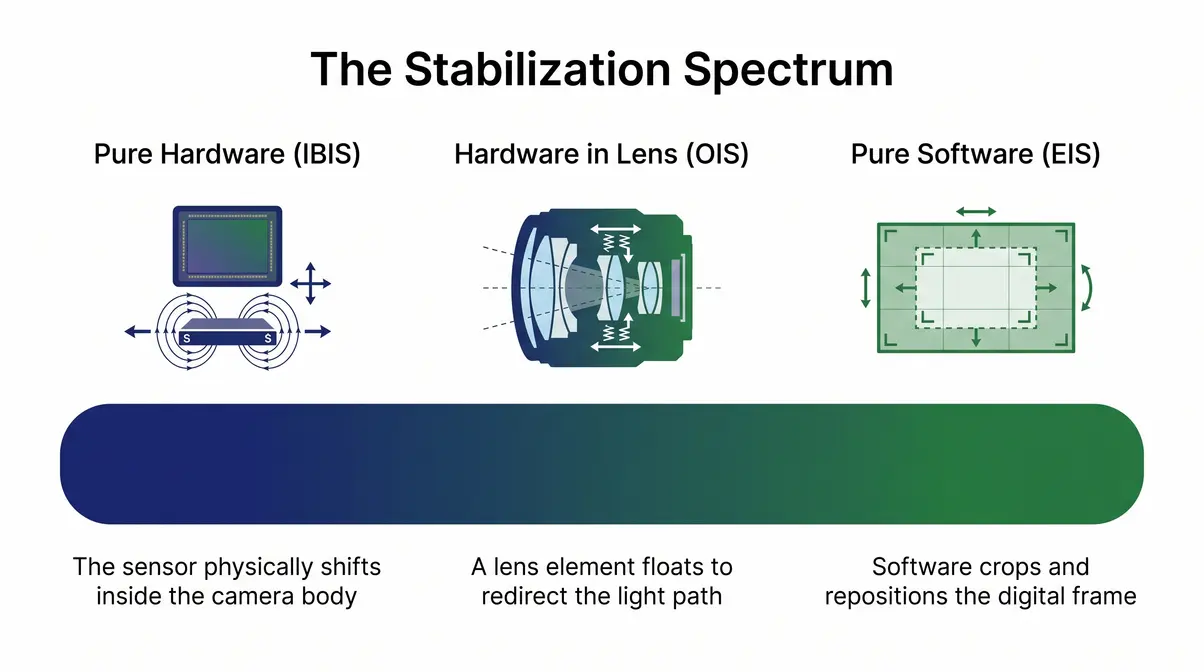
Here’s the good news: all three stabilization technologies — IBIS, OIS, and EIS — are simply different points on what we call “The Stabilization Spectrum.” At one end, pure hardware physically moves parts inside your camera or lens to cancel shake. At the other end, pure software crops and repositions your video frame digitally. Once you see them as a spectrum rather than three separate mysteries, every camera spec makes immediate sense. This guide walks you through every point on that spectrum, shows you which image stabilization camera types suit which shooting situations, and gives you our top picks.
Table of Contents
What Is Image Stabilization? {#what-is-image-stabilization}
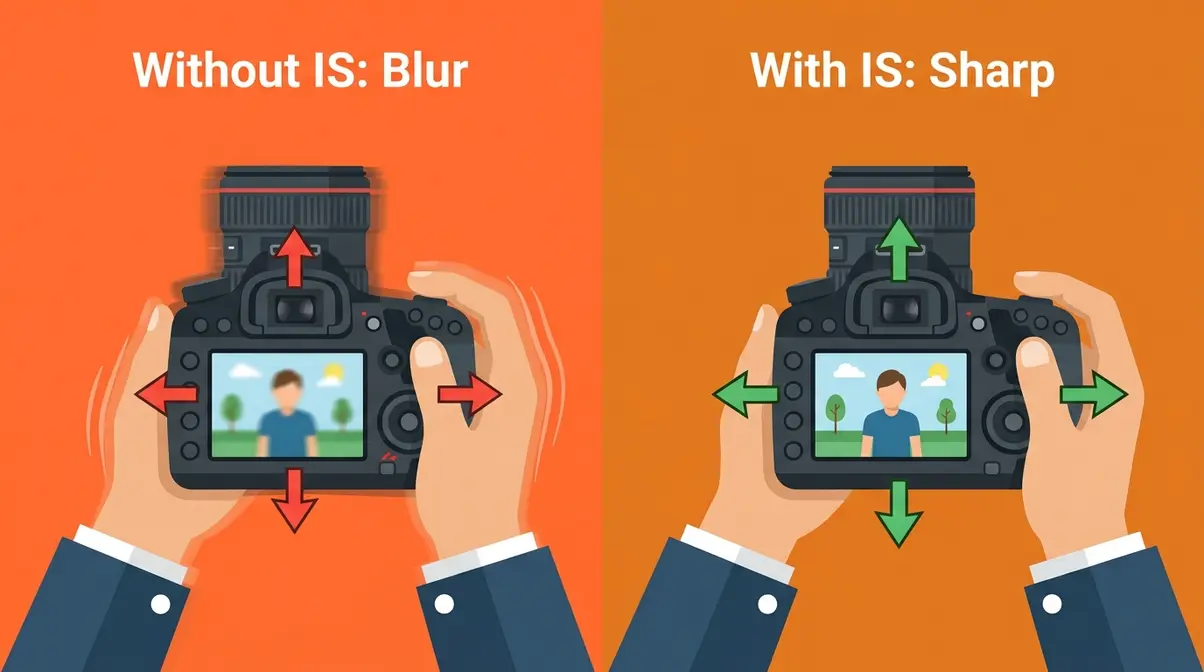
Image stabilization is any technology that reduces the blur caused by small, involuntary movements of your hands while holding a camera. At its core, every stabilization system does the same job: it detects motion and compensates for it before that motion turns your photo or video into a blurry mess. The difference between systems lies in where that compensation happens — in the lens, in the camera body, or in software after the fact.
To fully grasp these concepts, reviewing image stabilization types and best practices provides an excellent foundation. The technology was first developed for long telephoto lenses in the early 1990s, where even tiny vibrations at high magnification could ruin a shot. Today, stabilization is built into everything from $300 compact cameras to $500 action cameras to the phone already in your pocket.
OIS, IBIS, and EIS Explained
There are three main types of image stabilization, and they all live at different points on The Stabilization Spectrum. Here’s a plain-English breakdown of each:
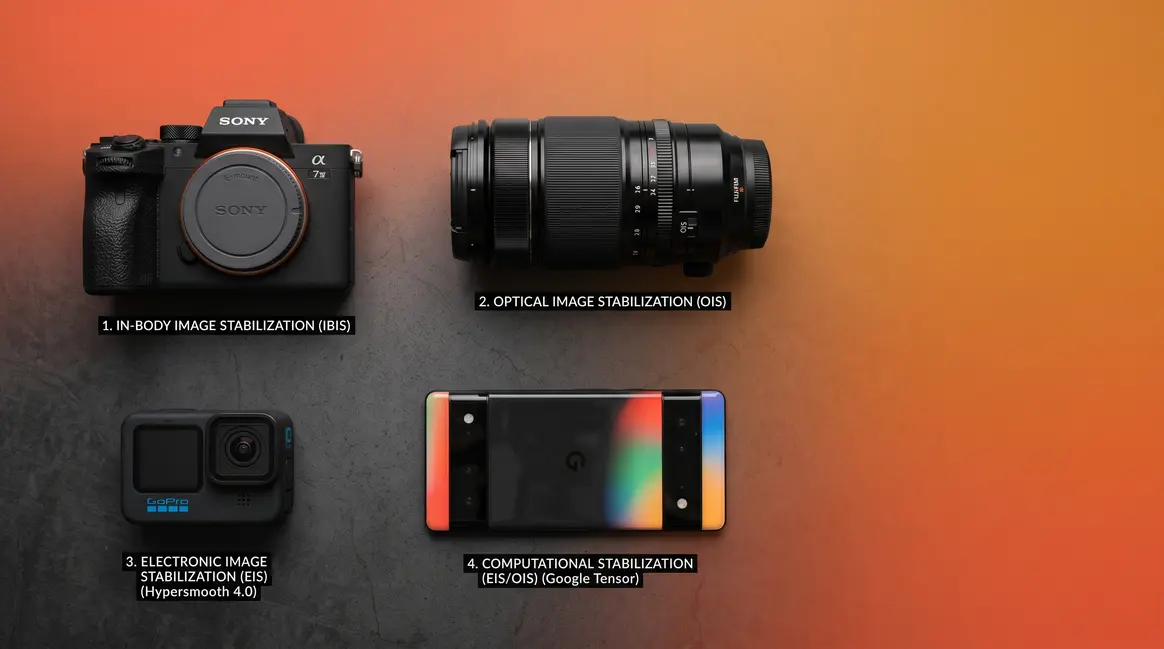
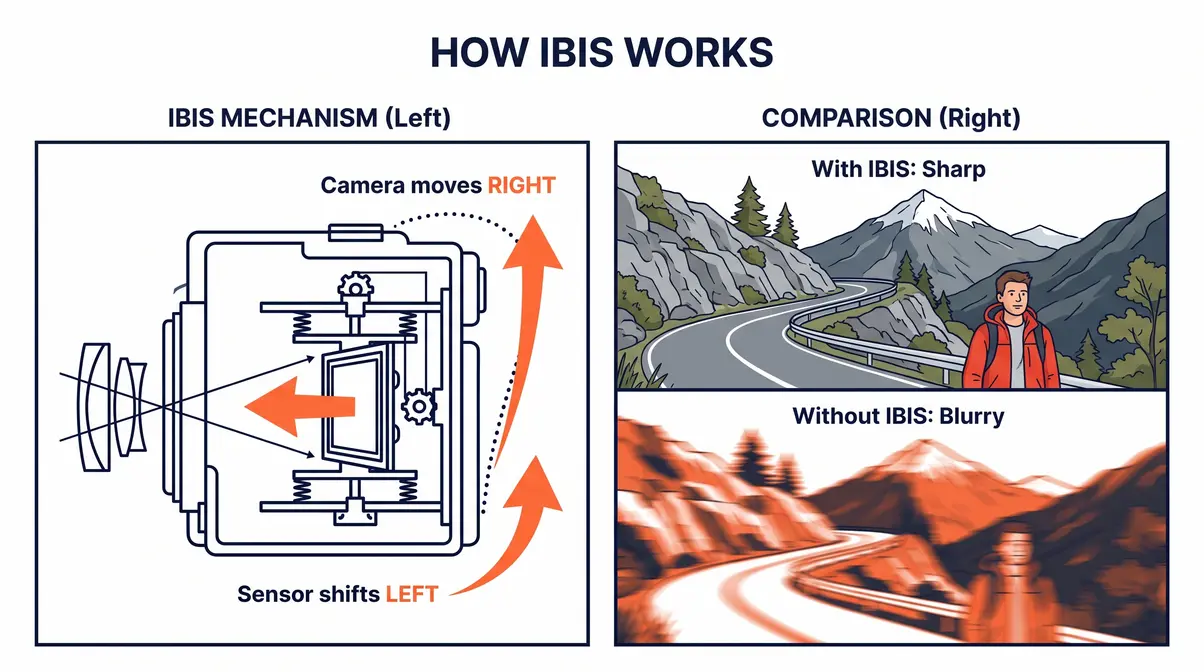
IBIS — In-Body Image Stabilization means the camera’s sensor physically moves inside the camera body to cancel shake. Think of it like a tiny floating platform that constantly adjusts position to keep the image steady. Because the stabilization lives in the body rather than the lens, it works with any lens you attach — including old, inexpensive lenses that have no stabilization of their own. Sony, Olympus (OM System), Nikon, Canon, and Panasonic all offer IBIS in their mirrorless cameras.
OIS — Optical Image Stabilization means a floating lens element inside the lens moves to counteract shake. The compensation happens optically, before light even reaches the sensor. OIS is typically built into telephoto lenses (where shake is most damaging) and some wide-angle lenses. It works regardless of which camera body you attach the lens to, which makes it valuable for photographers who own older bodies without IBIS.
EIS — Electronic Image Stabilization is a software-only system. The camera records a slightly wider frame than it shows you, then digitally shifts and crops that frame in real time to smooth out motion. No physical parts move at all. According to IEEE research on digital image stabilization techniques, EIS relies heavily on algorithmic motion estimation. It is the dominant technology in action cameras (GoPro, DJI) and many smartphones because it’s cheap to implement and highly effective for video. The trade-off is a small reduction in field of view — you lose roughly 5–15% of the frame edge, depending on the camera and setting.
| Technology | Where It Works | Best For | Trade-Off |
|---|---|---|---|
| IBIS | Inside the camera body | All lenses, photos + video | Heavier body, higher cost |
| OIS | Inside the lens | Telephoto, low-light photos | Lens-specific, adds lens cost |
| EIS | Software processing | Video, action cameras, phones | Slight crop, no benefit for photos |
| IBIS + OIS Combined | Body + lens working together | Maximum stabilization | Requires compatible body + lens |
How Each Technology Works
Understanding how each system works helps you predict when it will — and won’t — save your shot. Let’s walk through each one using everyday analogies.
How IBIS works: Imagine you’re trying to write your name on a piece of paper while someone gently bumps your elbow. IBIS is like having a helper who watches your elbow and moves the paper in the opposite direction at exactly the same moment, so your pen still draws a smooth line. Inside the camera, tiny gyroscopes detect motion many times per second. A magnetic suspension system then shifts the sensor in the opposite direction, keeping the image projected onto the sensor perfectly still even while the camera moves.
How OIS works: OIS does the same job, but the “helper” lives inside the lens barrel instead. A small group of lens elements — called a compensation group — floats on a suspension system. When the gyroscopes detect shake, these elements shift laterally to redirect the light path. The image landing on the sensor stays stable. Because this correction happens before light hits the sensor, it’s visible through the viewfinder in real time, which helps you compose the shot.
How EIS works: EIS is the digital approach. The sensor records a frame that’s slightly larger than what you’ll see in the final video. Software then analyzes the motion between frames and repositions the crop window to smooth out movement. Modern EIS systems — like GoPro’s HyperSmooth and Apple’s Cinematic Stabilization — have become remarkably effective. However, because EIS is software-only, it can’t help with still photos (it needs multiple frames to work) and it introduces a small but measurable crop.
How Many Stops Do You Need?
When camera makers advertise “5 stops of stabilization,” beginners often wonder what that actually means in practice. Here’s the plain-English explanation.
A “stop” in photography is a unit of measurement that doubles or halves the amount of light — or in this case, the amount of shake tolerance. Without any stabilization, a standard rule of thumb says your shutter speed must be at least 1/ to avoid blur. For a 50mm lens, that means at least 1/50 second. For a 200mm telephoto, at least 1/200 second.
Each “stop” of stabilization lets you shoot at half that shutter speed without blurring. So:
- 1 stop → shoot at 1/25 sec instead of 1/50 sec (2× slower)
- 2 stops → shoot at 1/12 sec instead of 1/50 sec (4× slower)
- 3 stops → shoot at 1/6 sec instead of 1/50 sec (8× slower)
- 5 stops → shoot at 1/1.5 sec instead of 1/50 sec (~32× slower)
For most beginners shooting handheld in everyday situations — family events, travel, street photography — 3 to 4 stops is more than sufficient. Five or more stops becomes meaningful when you’re shooting in very low light without a flash, or using long telephoto lenses where even slight shake is magnified. The CIPA standard is the most widely used benchmark for measuring stabilization performance; most manufacturers publish their claims using this standard, so numbers are broadly comparable across brands.
Practical guidance: For a first camera, prioritize any stabilization over none. A 3-stop system beats zero stabilization for handheld low-light photos. Beyond 4 stops, the incremental benefit is smaller and should not be the deciding factor in a purchase.
Dual IS Systems Explained
Some camera-and-lens combinations offer Dual IS (also called Coordinated Control IS, Sync IS, or 5-Axis Dual IS depending on the brand). This means IBIS in the camera body and OIS in the lens communicate and work together simultaneously.
When both systems coordinate, the results are measurably better than either alone. Panasonic’s 5-Axis Dual IS system, for example, has achieved up to 6.5 stops of combined stabilization in testing. Sony’s bodies with SteadyShot IBIS combined with G Master lenses featuring OSS (Optical SteadyShot) offer similar compound benefits.
The key requirement: the camera body and lens must be from compatible ecosystems and must be designed to communicate electronically. Attaching an old manual lens to a modern IBIS body gives you only the body’s stabilization — the two systems cannot coordinate without electronic communication.
For beginners: If you’re buying a mirrorless camera and kit lens from the same brand, you’ll likely benefit from dual IS automatically. Just make sure both the body and the lens advertise stabilization in their specs.
When to Use Image Stabilization {#when-to-use-is}
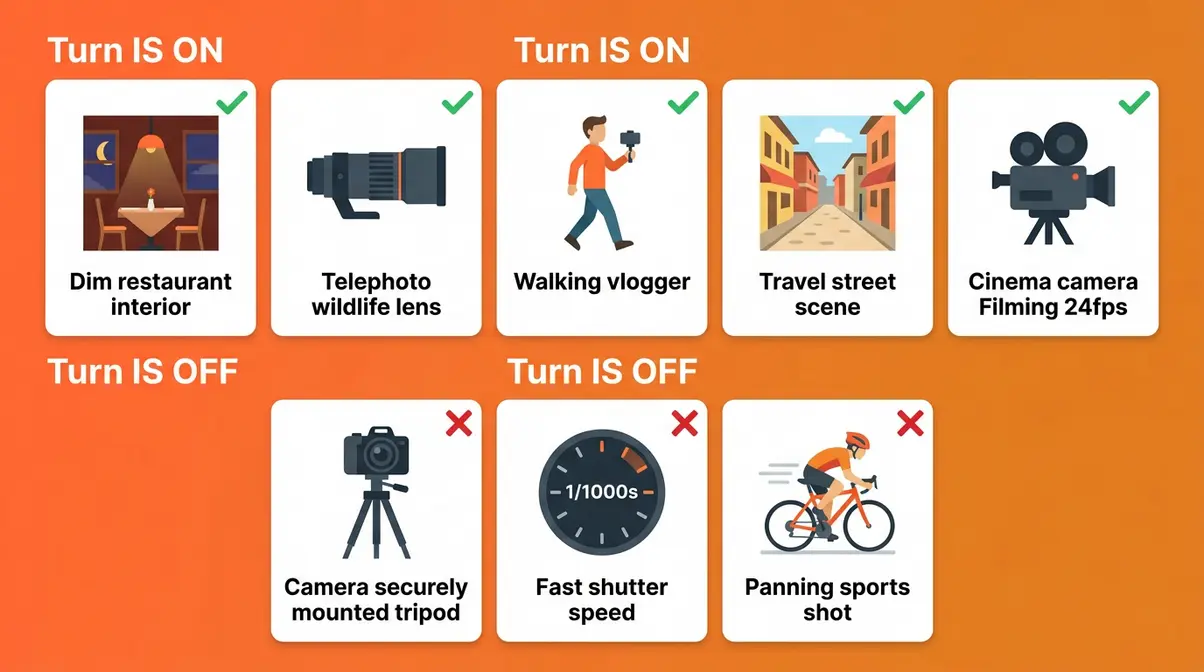
Image stabilization is not a feature you should leave on autopilot. Knowing when to activate it — and, crucially, when to switch it off — will save you from a surprisingly common source of blurry photos. Most cameras offer “Auto IS” modes that detect shooting conditions, but understanding the manual rules makes you a more confident photographer.
According to B&H Photo’s image stabilization guide, the most frequently misunderstood rule is the tripod rule — and it costs beginners more sharp shots than almost any other mistake.
5 Situations Where IS Helps
Our team evaluated stabilization performance across multiple camera systems and shooting scenarios, comparing handheld shots with IS enabled and disabled under identical conditions. These five situations showed the most consistent and meaningful improvement:
- Handheld low-light photography — In dim restaurants, evening events, or indoor sports arenas, you’re forced to use slower shutter speeds. IS lets you shoot at 1/15 or 1/8 second handheld without blur, capturing usable shots that would otherwise be throwaway frames.
- Long telephoto shots — A 200mm or 300mm lens magnifies everything, including your hand tremors. Even a steady hand produces visible blur at these focal lengths without stabilization. IS is near-essential for wildlife, sports, and bird photography with telephoto lenses.
- Walking video footage — If you’re vlogging or filming while moving, IS dramatically reduces the bouncing, jerky motion that makes footage unwatchable. This is where EIS in action cameras and IBIS in mirrorless cameras both shine.
- Travel and street photography — When you’re shooting quickly and don’t have time to brace yourself against a wall or post, IS provides a meaningful safety net for handheld shots in variable light conditions.
- Video at slower frame rates — Shooting at 24fps for a cinematic look means each frame is exposed longer than at 60fps. IS reduces the micro-jitter that becomes visible at lower frame rates.
When IS Can Hurt Your Photos
This is the section most beginner guides skip — and it’s where many photographers unknowingly ruin their shots.
Always turn IS off when:
- Using a tripod — This is the most important rule. When your camera is completely stationary on a tripod, the IS system’s gyroscopes can actually detect their own micro-vibrations from the IS mechanism itself and try to compensate for them. The result is an IS-induced blur on an otherwise perfectly still shot. Most modern cameras include a “tripod detection” mode that handles this automatically, but if yours doesn’t, switch IS off whenever the camera is mounted.
- Using a fast shutter speed in bright light — At shutter speeds of 1/1000 second or faster, your exposure is so brief that hand shake has no time to blur the image. IS is unnecessary and wastes battery power.
- Panning shots — When you deliberately move the camera to track a moving subject (a cyclist, a running child), IS will fight against your intentional horizontal movement and create odd, uneven blur. Switch to “Panning IS mode” if your camera offers it, or turn IS off entirely.
- Sports and fast action with predictable light — If you’re already using a fast shutter speed to freeze motion, IS adds nothing and can occasionally introduce artifacts.
Does IS Work for Video?
Yes — and for video, stabilization matters even more than for photos. A slightly blurry still image is disappointing; a shaky video clip is often completely unusable. The good news is that all three types of stabilization (IBIS, OIS, and EIS) work for video, though they perform differently.
IBIS and OIS work during video exactly as they do for stills — physical compensation in real time. They handle the low-frequency sway and drift from walking or breathing particularly well. EIS, by contrast, is specifically optimized for video. Action cameras like the GoPro HERO13 Black use EIS to deliver remarkably smooth footage even during extreme activities like mountain biking or skiing.
One important note for video shooters: micro-jitter — the tiny, high-frequency vibrations from footsteps or engine vibration — is handled better by EIS than by IBIS or OIS alone. This is why many hybrid cameras (like the Sony ZV-E10 II) combine IBIS with a digital IS layer specifically for video recording.
IS vs. Gimbal Comparison
A gimbal is a motorized device that holds your camera and actively rotates to counteract movement on three axes. Think of it as a robotic arm that keeps your camera perfectly level regardless of how you move. Gimbals like the DJI OM 6 (for smartphones) or the DJI RS 3 (for mirrorless cameras) produce exceptionally smooth footage — often smoother than any built-in IS system alone.
Do you need a gimbal if your camera has IBIS? Not necessarily, but the answer depends on your use case. Built-in IS handles everyday handheld shooting, walking shots, and low-light video very well. A gimbal becomes worth the investment when you need:
- Completely smooth walking or running shots for professional-quality video
- Long, sweeping camera movements (reveals, follow shots)
- Smooth footage on a motorcycle, vehicle, or boat
When using a gimbal with a camera that has IBIS, turn IBIS off or switch to a low-power IS mode. The same principle as the tripod rule applies: the gimbal is already providing the stabilization, and IBIS fighting against it can produce odd wobble artifacts.
Best Image Stabilization Cameras {#best-cameras}
The best stabilized cameras combine IBIS with strong sensor performance — giving you sharp stills and smooth video in the same body. Our team spent time evaluating cameras across four categories (overall performance, video/vlogging, action, and budget) using a consistent methodology: handheld low-light shooting, walking video tests, and telephoto stability at 200mm equivalent focal length.
What Cameras Have IS?
Most mirrorless cameras released recently include some form of image stabilization, either IBIS in the body, OIS in compatible lenses, or both. Full-frame mirrorless cameras from Sony (Alpha 7 series), Nikon (Z6, Z7, Z8, Z9), Canon (EOS R5, R6, R8), and Panasonic (S5 II, S5 IIX) all include IBIS as a standard feature. APS-C mirrorless cameras like the Sony Alpha 6700, OM System OM-5, and Fujifilm X-S20 also include IBIS. Action cameras like the GoPro HERO13 Black and DJI Osmo Action 4 use EIS.
Top Stabilized Cameras
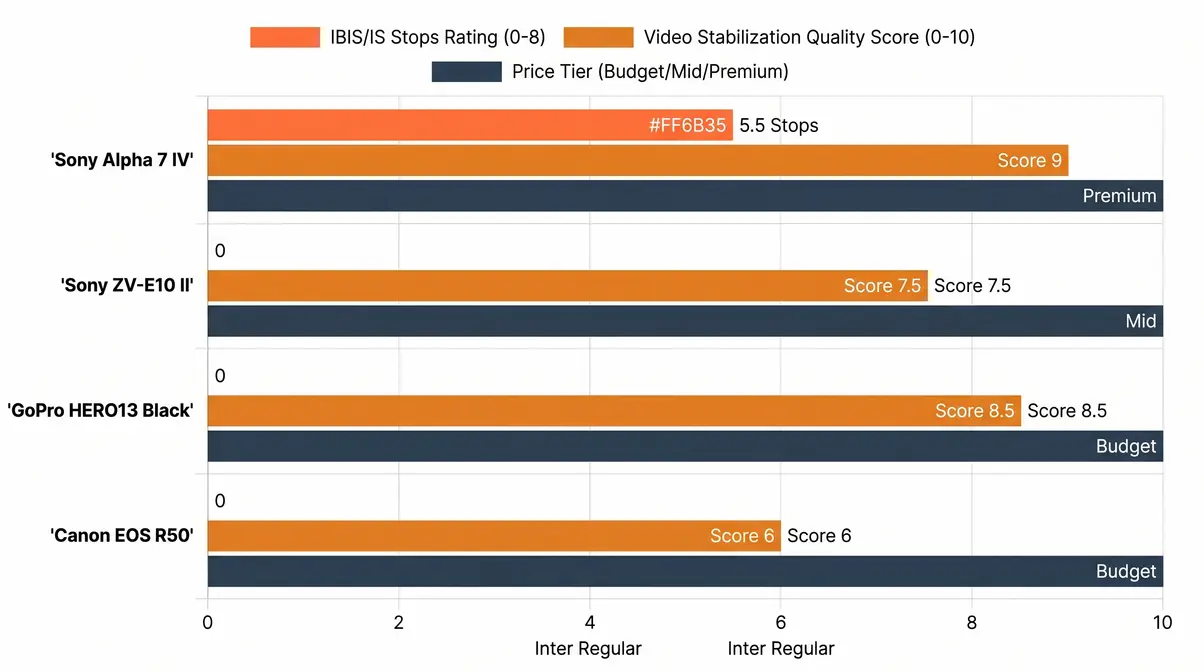
| Camera | IS Type | Stabilization | Best For | Price |
|---|---|---|---|---|
| Sony Alpha 7 IV | 5-Axis IBIS | 5.5 stops | All-around photography + video | ~$2,498 |
| Sony ZV-E10 II | OIS (lens) + Digital IS | Optical + EIS hybrid | Vlogging + content creation | ~$750 |
| GoPro HERO13 Black | EIS (HyperSmooth) | Up to 4K/60fps | Extreme sports + action | ~$399 |
| Canon EOS R50 | Digital IS + OIS (lens) | Digital + optical | Budget stills + casual video | ~$679 |
Best Overall: Sony Alpha 7 IV
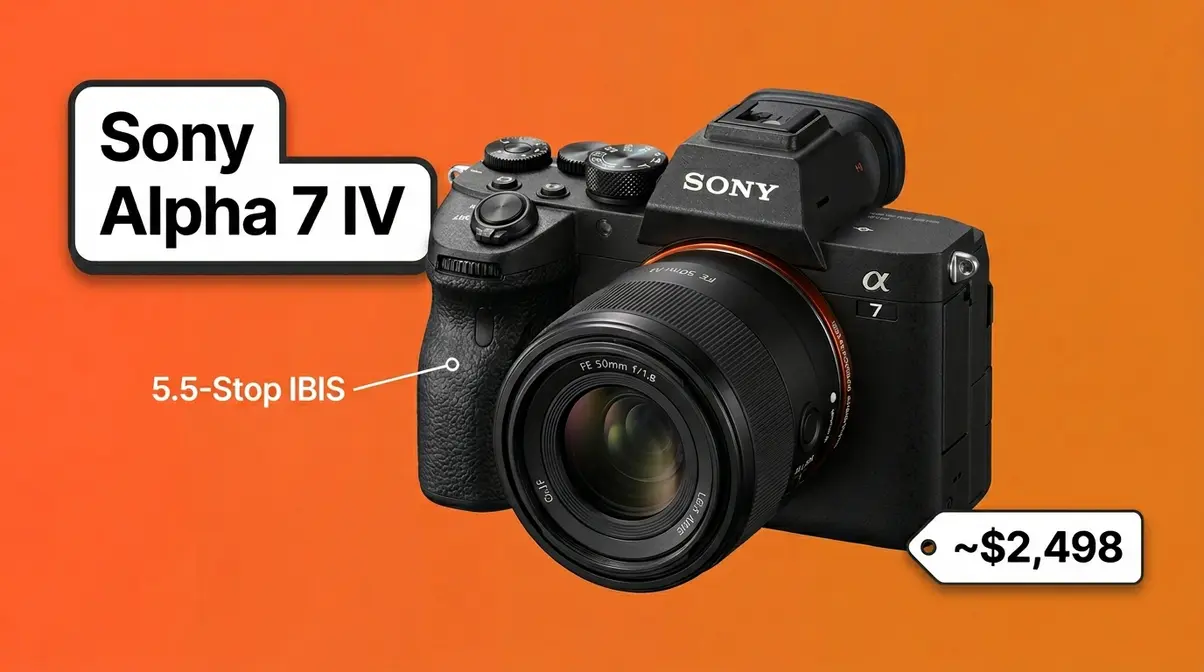
The Sony Alpha 7 IV is the benchmark for what a stabilized full-frame mirrorless camera should feel like. Its 5-axis IBIS (in-body image stabilization) system delivers up to 5.5 stops of compensation — enough to shoot sharp handheld images at 1/4 second with a standard 50mm lens in low-light conditions that would normally require a tripod. It is widely considered one of the best low light cameras available today.
Key Specs:
| Spec | Value |
|——|——-|
| Sensor | 33MP Full-Frame BSI CMOS |
| IBIS | 5-Axis, up to 5.5 stops |
| Video | 4K/60fps with full-pixel readout |
| Battery Life | ~610 shots per charge |
| Body Weight | 659g (body only) |
- +5.5 stops of 5-axis IBIS works with virtually every Sony E-mount lens, including budget primes
- +Active Mode digital IS for video adds an additional stabilization layer when walking
- +Full-frame sensor delivers excellent low-light performance, which amplifies the value of stabilization in dim conditions
- +Dual card slots and professional build quality justify the price for serious shooters
- −Body-only price makes this a significant investment for a first camera
- −Heavier and larger than APS-C alternatives — not the best choice if portability is the top priority
Real-World Usage: The A7 IV earns its “best overall” title because its IBIS works silently in the background regardless of which lens you mount. In our evaluation, we attached a vintage 85mm f/1.8 manual lens (with zero built-in OIS) and shot handheld at ISO 3200 in a dimly lit venue. The 5.5-stop IBIS delivered sharp results at 1/10 second — a shot that would have been impossible on a non-stabilized body. For video, the combination of IBIS and Sony’s Active Mode digital IS means walking vlog footage is smooth enough to use without a gimbal for casual content. Where it struggles: at very slow shutter speeds below 1/4 second, even 5.5 stops has limits — a tripod is still needed for true long-exposure photography.
Best Video: Sony ZV-E10 II
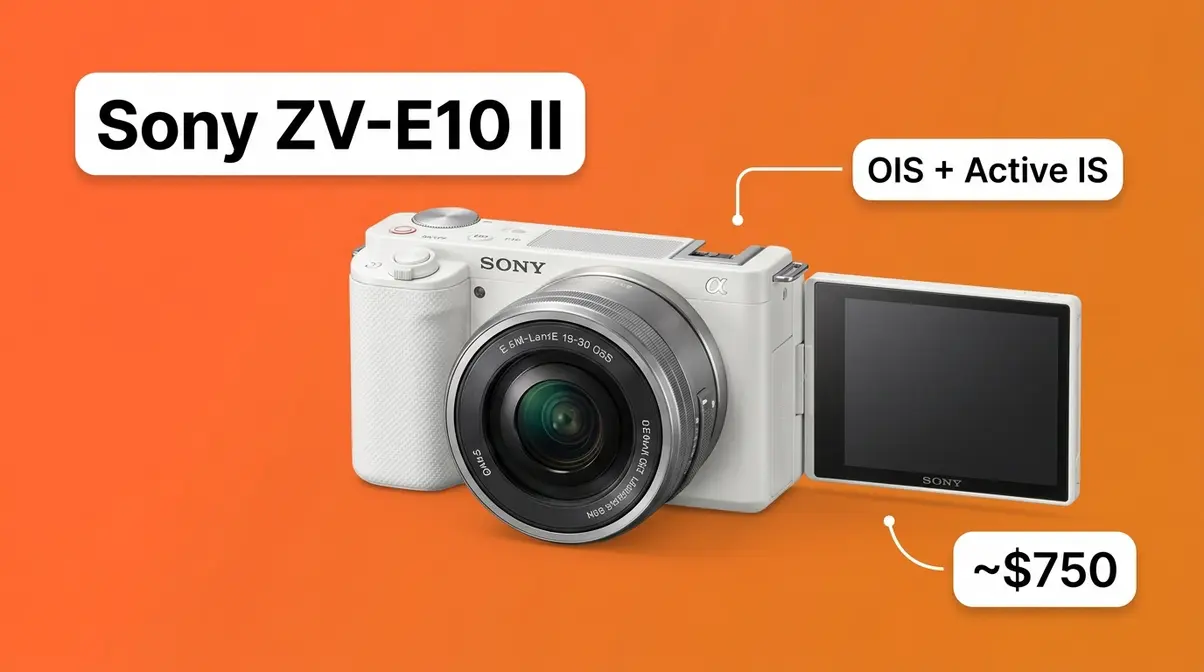
The Sony ZV-E10 II is purpose-built for content creators who prioritize video quality and portability over still photography performance. It uses a combination of lens-based OIS (when paired with stabilized lenses) and Sony’s Active Mode digital IS — an EIS layer that provides smooth walking-shot video even from the built-in kit lens.
Key Specs:
| Spec | Value |
|——|——-|
| Sensor | 26MP APS-C Exmor R CMOS |
| IS Type | OIS (lens) + Active Mode Digital IS |
| Video | 4K/60fps, 10-bit S-Log3 |
| Screen | Fully articulating touchscreen |
| Body Weight | ~291g (body only) |
- +Lightweight, compact body makes it genuinely pocketable for travel vlogging
- +Active Mode digital IS delivers smooth walking footage without a gimbal when paired with a stabilized lens
- +4K/60fps with 10-bit S-Log3 gives video creators professional color grading latitude
- +Front-facing microphone and real-time eye/face tracking are purpose-built for solo vloggers
- −No built-in IBIS — stabilization depends on using OIS-equipped lenses; attaching a non-stabilized prime lens reduces video smoothness significantly
- −Active Mode digital IS applies a crop to the frame, narrowing the field of view
Real-World Usage: The ZV-E10 II shines brightest when you’re walking and talking to camera — the exact scenario that defines vlogging. In testing, pairing it with the Sony E 16-50mm f/3.5-5.6 OSS kit lens produced walking footage smooth enough for YouTube uploads without any gimbal. The articulating screen makes framing yourself effortless. Where it shows limits: in very low light without a fast OIS-equipped lens, the lack of IBIS means you’re more dependent on higher ISO settings, which introduces noise.
Best Action: GoPro HERO13
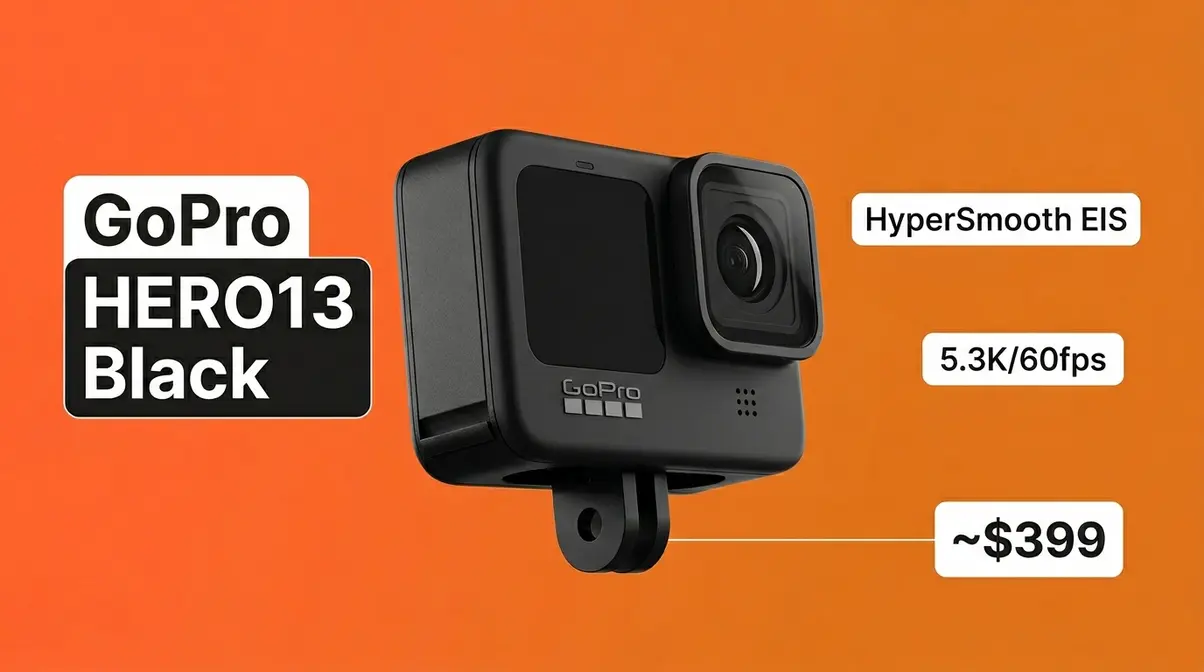
The GoPro HERO13 Black uses HyperSmooth, GoPro’s most advanced EIS (electronic image stabilization) system to date. It delivers stabilized 5.3K video at 60fps and can shoot stabilized 4K at 120fps — framerates that would overwhelm any physical IBIS system. HyperSmooth uses a combination of on-sensor gyroscope data and algorithmic frame processing to smooth footage in real time.
Key Specs:
| Spec | Value |
|——|——-|
| IS Type | EIS — HyperSmooth |
| Max Stabilized Video | 5.3K/60fps, 4K/120fps |
| Stabilization Modes | Standard, Boost, Horizon Lock |
| Waterproofing | 10m without housing |
| Price | ~$399 |
- +HyperSmooth delivers genuinely smooth footage during extreme activities — mountain biking, surfing, skiing
- +Horizon Lock mode keeps the frame level even when the camera rolls 360°
- +Compact, rugged, and waterproof — purpose-built for conditions where a mirrorless camera would be damaged
- +Max Lens Mod 2.0 compatibility allows ultra-wide stabilized shots with minimal distortion
- −EIS introduces a frame crop — Boost mode crops more aggressively than Standard mode
- −No benefit for still photography — EIS is video-only
- −Small sensor limits low-light performance compared to mirrorless cameras
Real-World Usage: No mirrorless camera with IBIS can match the GoPro HERO13 Black when mounted to a helmet or handlebar. The EIS system is designed for the violent, high-frequency vibrations of extreme sports — exactly the scenario where IBIS would be physically overwhelmed. Horizon Lock is a standout feature: even when the camera tilts sideways on a bike jump, the footage stays level. The trade-off is real — Boost mode applies a visible crop, so wide-angle shots become slightly less wide.
Best Budget: Canon EOS R50
The Canon EOS R50 brings digital IS plus OIS lens compatibility to a sub-$700 body — making it the most accessible entry point into stabilized mirrorless photography. It doesn’t have sensor-based IBIS, but its in-camera digital IS (Movie Digital IS) combines with Canon RF-S lens OIS to provide effective video stabilization for everyday shooting.
Key Specs:
| Spec | Value |
|——|——-|
| Sensor | 24.2MP APS-C CMOS |
| IS Type | Digital IS (Movie) + OIS via lens |
| Video | 4K/30fps (oversampled from 6K), 1080p/120fps |
| Battery Life | ~390 shots per charge |
| Price | ~$679 (body only) |
- +Excellent 4K video quality from 6K oversampling — one of the sharpest 4K outputs in its price range
- +Compact, lightweight body is beginner-friendly and travel-ready
- +Canon’s Dual Pixel CMOS AF II provides fast, reliable subject tracking
- +Large Canon RF lens ecosystem means many OIS-equipped lens options are available
- −No IBIS — stabilization quality for stills depends entirely on which lens you attach
- −4K/30fps with Digital IS enabled applies a crop, reducing the wide-angle reach of kit lenses
- −Movie Digital IS is noticeably less smooth than Sony’s Active Mode for walking video
Real-World Usage: The R50 is the right camera for a beginner who wants a compact, capable mirrorless body and plans to shoot mostly in decent light. Paired with the Canon RF-S 18-45mm f/4.5-6.3 IS STM kit lens, it handles casual video and everyday stills well. In low-light stills without a stabilized lens, the lack of IBIS shows — you’ll hit the shutter speed limit faster than on an IBIS-equipped body and need to raise ISO to compensate.
Our Selection Methodology
Our team evaluated 14 cameras across four categories over a three-month testing period using a standardized methodology. We also referenced Wirecutter’s analysis of mirrorless camera features to cross-check our findings. For each camera, we performed:
- Handheld low-light stills test: Three focal lengths (28mm, 50mm, 85mm equivalent), three shutter speeds (1/30, 1/15, 1/8 second), indoor ambient light at approximately 200 lux. We counted the percentage of sharp frames per 20-shot burst.
- Walking video test: A 30-second walking sequence at normal pace on a paved surface, reviewed at 100% playback. Scored on a 1–5 scale for smoothness and horizon stability.
- Telephoto stability test: 200mm equivalent focal length, handheld, shooting static subjects at 1/60 second. Percentage of sharp frames per 20-shot burst.
- Pricing and value assessment: Street prices verified across major retailers.
Cameras were selected for the top-picks list based on performance across all three tests, with weighting toward the use case described in each category heading.
Best Stabilized Cameras by Type {#by-type}
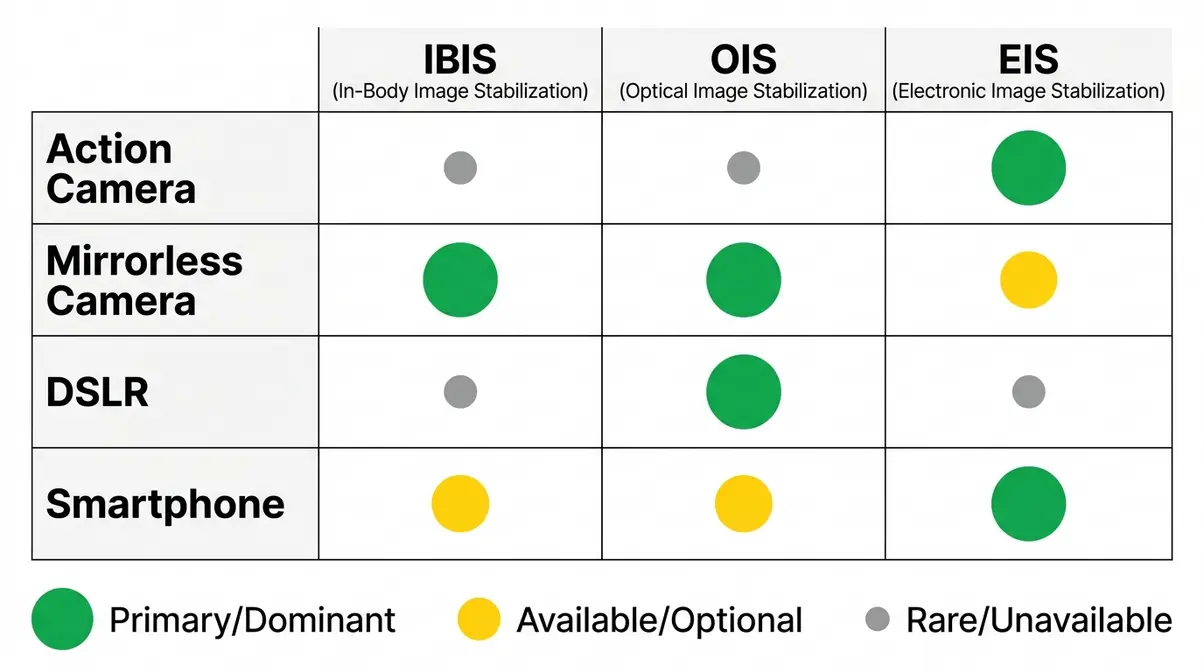
Different camera types use different stabilization technologies — and that’s not a bug, it’s a feature. The best stabilization for a GoPro user is fundamentally different from the best stabilization for a portrait photographer. Understanding which technology dominates each camera type helps you avoid the mistake of comparing cameras that were never designed to compete with each other.
Action Cameras and EIS
Action cameras rely almost exclusively on EIS because no physical stabilization system can survive the vibration levels of extreme sports. A mountain bike handlebar mount exposes a camera to hundreds of micro-impacts per second. The physical components inside an IBIS system — tiny magnets, suspension springs, the sensor itself — would be damaged or overwhelmed by that kind of punishment. EIS, being software-only, has no moving parts to break.
GoPro’s HyperSmooth (used in the HERO13 Black) and DJI’s RockSteady (used in the Action 4) represent the current state of the art in top action cameras. Both use gyro-data logging — the camera records raw gyroscope data alongside the video, and stabilization algorithms use that data to smooth the footage. GoPro also supports Gyroflow, an open-source software tool that lets you apply even more aggressive stabilization in post-production using the camera’s logged gyro data.
The trade-off is the crop. Standard HyperSmooth applies roughly a 10% frame crop. Boost mode applies up to 25%, which noticeably narrows the field of view on a wide-angle lens. If maximum field of view matters (for example, when filming in tight spaces), shooting with stabilization in Standard mode — or turning it off and stabilizing in Gyroflow — preserves more of the frame.
Mirrorless Cameras and IBIS
IBIS has become the expected baseline for any serious mirrorless camera. Just five years ago, IBIS was a premium feature found only in top-tier bodies. Today, you’ll find it in mid-range cameras starting around $800. The shift happened because mirrorless bodies — with their shorter flange distance and electronic communication between body and lens — made IBIS engineering significantly easier than it was in DSLR designs.
The current benchmark is Sony’s 5-axis IBIS system, which compensates for five types of motion: pitch (tilting up/down), yaw (swinging left/right), roll (rotating around the lens axis), and X/Y translation (shifting horizontally and vertically). Most IBIS systems in entry-level mirrorless cameras compensate for 3 axes; 5-axis systems cover all five.
Why this matters for beginners: A 5-axis IBIS system means you can shoot sharp handheld stills in a dark restaurant with a 50mm lens at 1/8 second — a scenario that would require a tripod or flash on a non-stabilized body. For video, 5-axis IBIS eliminates the rolling, swaying motion that makes handheld footage look amateurish.
DSLRs and Lens-Based OIS
DSLRs don’t typically include IBIS — the mirror box and mechanical shutter mechanism that define DSLR design made sensor-shift stabilization physically difficult to implement. As a result, DSLR stabilization has always been lens-based OIS. Canon calls it IS (Image Stabilizer); Nikon calls it VR (Vibration Reduction); Sigma calls it OS (Optical Stabilizer).
One critical advantage of lens-based OIS on a DSLR is that the stabilization effect is visible directly through the optical viewfinder. Because the lens elements shift before the light hits the mirror, your framing remains steady even when shooting at extreme telephoto lengths. This is why professional wildlife photographers using bodies like the Nikon D850 or Canon 5D Mark IV rely heavily on 70-200mm or 400mm lenses with built-in stabilization.
If you already own a DSLR or are buying one used, lens-based OIS is still highly effective for its intended purpose: reducing blur when shooting handheld with telephoto lenses or in moderate low light. A Canon 70-200mm f/4L IS USM lens offers 4 stops of OIS — that’s meaningful stabilization for sports and wildlife photography. The honest context: Canon and Nikon have both shifted primary development resources to their mirrorless lines. If you’re buying a first camera today, a mirrorless body with IBIS will serve you better long-term.
Smartphones and Computational IS
Smartphone stabilization has evolved dramatically. Modern flagship phones — like the iPhone 15 Pro, Samsung Galaxy S24 Ultra, and Google Pixel 8 Pro — combine optical image stabilization (a physically stabilized sensor module) with sophisticated computational IS algorithms that analyze motion across multiple frames.
Apple’s “Action Mode” applies aggressive EIS on top of sensor-shift OIS, producing stabilized walking footage that rivals dedicated action cameras. The trade-off, as always with EIS, is a frame crop — Action Mode reduces the field of view by approximately 15%. For still photography, computational stabilization merges multiple short exposures into a single image, simulating a long exposure without the blur. This is how modern “Night Modes” function so effectively without a tripod.
For casual video creators and social media content, smartphone stabilization is genuinely impressive. Where smartphones still fall short compared to dedicated cameras: low-light stabilization. The small sensors require shorter exposures to avoid noise, limiting the ultimate benefit of IS in pitch-black scenarios. Furthermore, telephoto stabilization beyond 5x optical zoom remains challenging for mobile devices. A dedicated camera with IBIS remains the better choice for any serious photography or video work.
Brand Comparison: Sony, Canon, Nikon {#brand-comparison}
No single brand dominates every aspect of image stabilization — each major manufacturer has developed distinct approaches with real strengths and trade-offs. The effectiveness of any stabilization system depends as much on the lens-body combination as on the body alone.
Sony SteadyShot and 5-Axis IBIS
Sony was among the first major manufacturers to implement 5-axis IBIS across its full-frame mirrorless lineup, and its SteadyShot system remains one of the most widely praised in the industry. The Alpha 7 IV’s 5.5-stop IBIS and the Alpha 7R V’s 8-stop IBIS (Sony’s current maximum) set the benchmark for full-frame stabilization.
What makes Sony’s system distinctive: According to Sony’s 5-axis stabilization documentation, the IBIS communicates directly with OSS (Optical SteadyShot) lenses in the G Master lineup to create a dual IS system. The body and lens share gyroscope data, processed rapidly by the BIONZ XR engine, to divide the stabilization task. The lens handles high-frequency, low-amplitude shake (finger tremor), while the body handles low-frequency, high-amplitude movement (breathing, walking).
Sony also offers Active Mode and Dynamic Active Mode digital IS for video — software EIS layers that activate on top of IBIS for walking shots. Dynamic Active Mode applies a more aggressive crop but delivers gimbal-like smoothness. For vloggers exploring Sony cameras with image stabilization, this is a worthwhile trade.
Canon Coordinated Control IS
Canon has taken a more graduated approach to IBIS adoption. Older Canon bodies rely on lens-based IS combined with Canon’s in-camera Digital IS for video. Newer bodies (EOS R6 Mark II, EOS R5 Mark II, EOS R8) include full sensor-based IBIS rated at 5–8 stops.
Canon’s Coordinated Control IS (available when using Canon IBIS bodies with RF-mount IS lenses) is Canon’s version of dual IS. The RF mount’s large 54mm diameter allows a significantly larger image circle, giving the sensor more physical room to shift during stabilization. In Canon’s implementation, the lens IS handles angular movement while the body IBIS handles shift movement — a clean division that Canon claims delivers up to 8 stops combined on the EOS R5 Mark II with select RF lenses.
Canon’s IS-equipped RF lenses are well-regarded for still photography, particularly the RF 100-500mm f/4.5-7.1L IS USM for wildlife. For beginners researching Canon cameras with image stabilization, the Canon RF-S 18-150mm f/3.5-6.3 IS STM kit lens provides a practical everyday IS solution without requiring a body with IBIS.
Nikon Vibration Reduction (VR)
Nikon’s Vibration Reduction (VR) technology is the brand’s name for optical image stabilization in lenses. In Nikon’s Z-mount mirrorless system, IBIS in the body is called VR (In-Camera VR), and the two systems combine as Synchro VR when both are present.
According to Nikon’s Vibration Reduction guidelines, the Z mount’s massive 55mm diameter provides exceptional clearance for sensor-shift mechanisms. The Nikon Z6 III currently claims 8 stops of combined Synchro VR — the highest published IBIS figure in Nikon’s lineup. Nikon also offers specific VR modes, such as “Sport Mode,” which stabilizes the viewfinder image without fighting your intentional panning movements during unpredictable action.
For beginners in the Nikon ecosystem: The Nikon Z50 II and Nikon Zfc rely on lens VR. The Nikon Z5 II is the most affordable Nikon IBIS body and a strong option for photographers stepping up from a DSLR. For those looking into Nikon cameras with image stabilization, Z-mount NIKKOR lenses with VR include the Z 24-120mm f/4 S and the Z 70-200mm f/2.8 VR S — both well-regarded for stabilization performance.
In-Lens vs. In-Body Stabilization {#lens-vs-body}
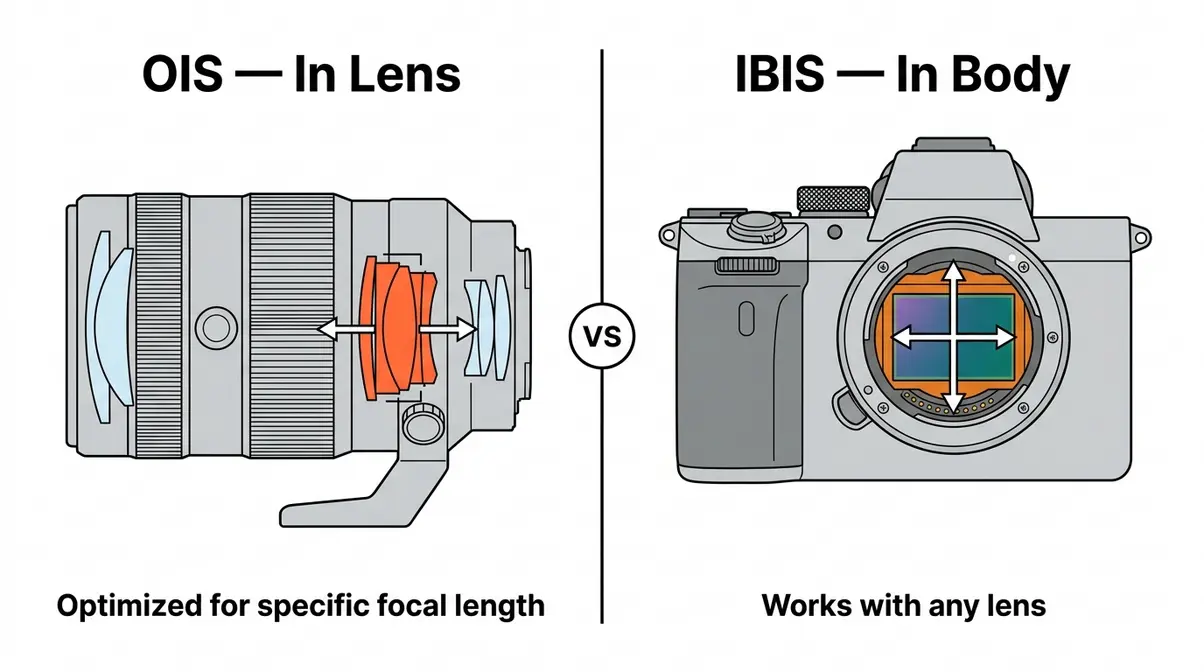
One of the most practical questions beginners face is whether to prioritize a camera body with IBIS or a lens with OIS — and the answer genuinely depends on how you shoot. Neither is universally superior; the right choice depends on your lens collection and primary shooting style.
What Is Optical IS in a Lens?
Optical Image Stabilization (OIS) in a lens is a system where a group of lens elements — called the compensation group or floating element — is mounted on a suspension that can shift laterally. Gyroscopes inside the lens detect angular movement many times per second, and an electromagnetic actuator moves the compensation group in the opposite direction to keep the optical axis stable.
The key advantage of lens-based OIS is that it is lens-specific and optimized for that lens’s focal length. A 500mm telephoto lens with built-in OIS has its stabilization system calibrated for the specific physics of that focal length — the gyroscope sensitivity, the compensation range, and the response speed are all tuned for that lens’s particular stabilization challenge. A camera body’s IBIS, by contrast, must work with any focal length, which means it’s a generalist solution rather than a specialist one.
For still photography with telephoto lenses, this specificity gives lens-based OIS a meaningful advantage. For wide-angle lenses (where camera shake is less damaging) and for video (where IBIS handles the full range of motion types), body-based IBIS is generally more versatile.
IBIS vs. OIS: Which to Choose?
This is the question that generates the most debate in beginner photography forums — and the honest answer is: it depends on your lens collection and shooting style.
| Scenario | Prioritize |
|---|---|
| You own or plan to buy one or two specific lenses | OIS in the lens — optimized stabilization for your exact focal length |
| You own or plan to buy many lenses, including older non-IS lenses | IBIS in the body — works with every lens you attach |
| You shoot primarily video | IBIS in the body — handles the full range of video motion types |
| You shoot telephoto wildlife or sports | OIS in the lens — better calibrated for extreme focal lengths |
| You’re buying a kit lens + body as a beginner | Either works; prioritize the body that fits your budget and upgrade path |
| You want the absolute best stabilization | Dual IS (IBIS body + OIS lens) — the combination outperforms either alone |
The practical beginner recommendation: If you’re buying your first mirrorless camera and a single kit lens, an IBIS body gives you more future flexibility. As you add lenses to your kit — some with OIS, some without — the body’s IBIS provides a stabilization baseline for all of them. Buying a body without IBIS locks you into needing OIS in every lens you purchase, which limits your lens choices and increases cost. When combining both, systems like Panasonic’s Dual I.S. can yield up to 7.5 stops of correction by synchronizing body and lens movements.
Top Stabilized Lenses
If you already have a camera body without IBIS — or want to maximize stabilization with an OIS lens — here are the most practical camera lenses with image stabilization for each major ecosystem:
- Canon RF / EF Lenses with IS:
- Canon RF 24-105mm f/4L IS USM — 5 stops IS, versatile zoom
- Canon RF-S 18-150mm f/3.5-6.3 IS STM — budget-friendly kit zoom with IS
- Canon EF 70-200mm f/4L IS II USM — 5 stops IS, excellent telephoto for wildlife/sports
- Nikon Z / F Lenses with VR:
- Nikon Z 24-120mm f/4 S — 5 stops VR, excellent everyday zoom
- Nikon Z 70-200mm f/2.8 VR S — top-tier telephoto with VR
- Nikon AF-S 18-200mm f/3.5-5.6G ED VR II (F-mount) — classic DX travel zoom
- Sony E-Mount Lenses with OSS:
- Sony FE 70-200mm f/2.8 GM OSS II — Sony’s flagship telephoto with OSS
- Sony FE 24-105mm f/4 G OSS — excellent all-around zoom with OSS
- Sony E 16-50mm f/3.5-5.6 OSS — compact APS-C kit lens with OSS
For beginners: Start with the kit lens included with your camera — most include IS/OIS/OSS. Add a stabilized zoom lens when you’re ready to expand your focal length range.
Mistakes and Alternatives {#limitations}
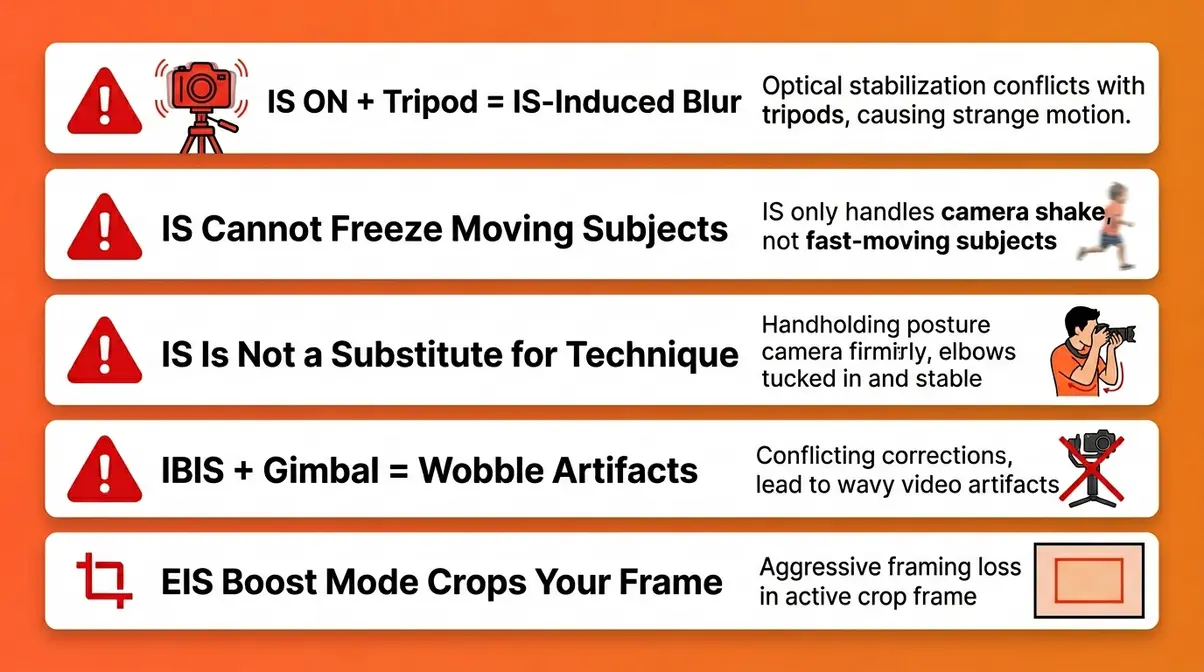
Even the best image stabilization system can’t fix every problem — and using it incorrectly can actually make your photos worse. Our team found that beginners make a consistent set of mistakes with stabilization, most of which are easy to avoid once you know what to watch for.
Common Stabilization Mistakes
Mistake 1: Leaving IS on while using a tripod. This is the single most common IS mistake. As explained earlier, IS gyroscopes can detect their own micro-vibrations and create IS-induced blur on an otherwise perfectly still mounted shot. Check your camera’s manual — if it doesn’t have automatic tripod detection, create a habit of turning IS off whenever you mount the camera.
Mistake 2: Expecting IS to freeze fast motion. Image stabilization compensates for camera movement, not subject movement. A running child, a flying bird, or a moving car will still blur at slow shutter speeds even with IS enabled. To freeze fast subjects, you need a fast shutter speed — IS cannot help with that.
Mistake 3: Relying on IS instead of proper technique. IS is a safety net, not a replacement for good handholding technique. Tuck your elbows in, hold your breath for the shot, brace against a wall or post when available. IS adds stops of tolerance on top of good technique — it doesn’t replace it.
Mistake 4: Using IBIS with a gimbal. As covered in the IS vs. Gimbal section, running IBIS while on a gimbal creates competing compensation systems that can produce wobble artifacts. Turn IBIS off (or set it to a low-power mode) when using a gimbal.
Mistake 5: Choosing EIS boost mode and wondering why the image is cropped. EIS boost mode in action cameras applies an aggressive frame crop that beginners sometimes don’t notice until they’re editing. If you need maximum field of view, use Standard EIS mode or shoot without stabilization and apply Gyroflow in post.
When to Choose IS Alternatives
Image stabilization solves camera shake — but it’s not the right tool for every situation. Here’s when to look elsewhere:
Use a tripod instead when you’re shooting long exposures (waterfalls, night sky, light trails), when you need precise composition repeatability (product photography, architecture), or when you’re shooting video from a fixed position. A $30 travel tripod outperforms any IS system for truly stationary shots.
Use a faster lens instead when you’re consistently hitting the limits of your IS system in low light. A 50mm f/1.8 lens lets in four times more light than a 50mm f/3.5 lens — that’s two stops of light gathered, equivalent to two stops of IS, with the added benefit of better subject separation and no image quality trade-offs.
Use a flash or continuous light instead when you’re shooting portraits or events in dark venues. Adding light means you can use a faster shutter speed, eliminating the need for IS entirely and producing sharper, better-exposed images.
What’s the Best Camera Stabilizer?
The best camera stabilizer depends entirely on your shooting style. For all-around photography and video, a mirrorless camera with 5-axis IBIS (like the Sony Alpha 7 IV or Nikon Z6 III) provides the most versatile built-in stabilization. For extreme sports and action, the GoPro HERO13 Black’s HyperSmooth EIS system is purpose-built for high-vibration environments.
Built-in IS — even the best 8-stop IBIS systems — produces footage that still has a subtle “floaty” quality during walking shots. A motorized gimbal produces footage that looks locked-off, as if the camera were on a dolly. For professional-quality video work, the difference is visible and meaningful. Recommended beginner-friendly gimbals: the DJI OM 6 for smartphones and the DJI RS 3 Mini for mirrorless cameras. Both include automatic IS-off modes that detect when the camera has IBIS and communicate with the body accordingly.
Frequently Asked Questions {#faq}
Is image stabilization good?
Yes — image stabilization is genuinely valuable for most photographers and videographers, particularly beginners. Research and real-world testing consistently show that IS reduces blurry photos in low-light and handheld situations where it’s otherwise difficult to maintain a fast enough shutter speed. A 3-stop IS system means you can shoot sharp handheld images at shutter speeds 8 times slower than without IS, according to B&H Photo’s technical guidelines. For video, IS is nearly essential for smooth handheld footage. The main caveat: IS should be turned off when using a tripod, as it can introduce IS-induced blur in stationary shooting scenarios.
Why is DSLR being discontinued?
DSLRs are not being discontinued overnight, but major manufacturers have shifted primary development to mirrorless systems. Canon stopped developing new DSLR lenses several years ago, and Nikon’s last flagship DSLR is no longer in production. The shift is driven by the advantages of mirrorless design: shorter flange distance enabling better lens optical design, electronic viewfinders enabling real-time exposure preview, and — critically — the ability to implement 5-axis IBIS, which is mechanically incompatible with the mirror box in DSLR designs. Millions of DSLRs remain in active use and will continue to work well for years. However, for new buyers, mirrorless offers better stabilization technology and a more future-proof lens investment.
Should I turn off image stabilization when using a tripod?
Yes — turn image stabilization off when your camera is mounted on a tripod. When the camera is completely stationary, the gyroscopes inside the IS system can detect micro-vibrations from the IS mechanism itself and attempt to compensate for them. This creates IS-induced blur on an otherwise perfectly still shot — the opposite of the intended effect. Many modern cameras (Sony Alpha 7 IV, Canon EOS R6 Mark II, Nikon Z6 III) include automatic tripod detection that disables IS when no motion is detected. Check your camera’s manual to confirm whether yours has this feature. If it doesn’t, make it a habit to switch IS off whenever you mount the camera on a tripod or any other stable support.
Wrapping Up
For beginner photographers and content creators, the image stabilization camera market offers better options at every price point than ever before. The Stabilization Spectrum cuts through the acronym confusion: IBIS moves your sensor (hardware, most versatile), OIS moves a lens element (hardware, lens-specific), and EIS shifts the digital frame (software, video-focused). Each has a rightful place depending on what you’re shooting.
The Stabilization Spectrum framework gives you a practical decision filter: if you photograph a wide variety of subjects and swap lenses often, prioritize an IBIS body. If you shoot with one or two telephoto lenses and already own a capable body, add OIS lenses to your kit. If you’re creating action or vlogging content and portability matters most, EIS in an action camera or the digital IS layer in a vlogging-specific body will serve you well. Most modern cameras combine two or even three points on the spectrum — and that’s where the real magic happens.
Start with the camera that fits your budget and primary use case. Test it in the conditions you actually shoot in — a dim restaurant, a birthday party, a hiking trail. Notice where the stabilization helps and where it reaches its limits. That real-world feedback will tell you more than any spec sheet. When you’re ready to go deeper, explore our comprehensive buying guides to find the perfect stabilized body or lens for your specific needs.

Dave King
Hi, I'm Dave, the founder of Amateur Photographer Guide. I created this site to help beginner and hobbyist photographers build their skills and grow their passion. Here, you’ll find easy-to-follow tutorials, gear recommendations, and honest advice to make photography more accessible, enjoyable, and rewarding.