Macro Photography Process: Complete Step-by-Step Guide
Discover the complete macro photography process, with a clear, step-by-step approach to capture, refine, and perfect impressive close-up images.

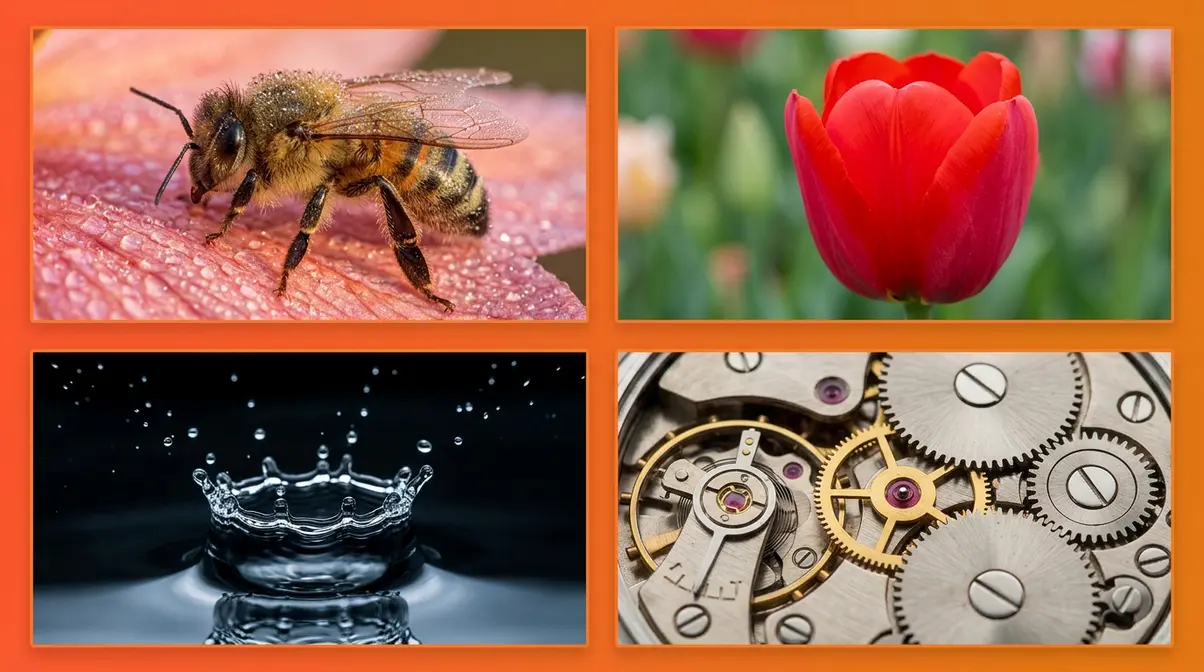
You’ve seen those breathtaking close-up images — a bee’s compound eye rendered in razor-sharp detail, a dewdrop balanced on a petal like a crystal ball. You’ve tried to replicate them, and the results have been blurry, flat, or frustratingly dark. That gap between what you imagine and what your camera produces is the central frustration of the macro photography process, and it’s almost never caused by bad gear. It’s caused by not yet understanding the three variables that macro amplifies beyond all others.
What’s in this guide
This guide gives you the complete macro photography workflow — from choosing gear and dialing in settings to composing shots, stacking focus planes, and finishing images in post. Whether you’re photographing insects in the field or water drops on a studio table, the same framework applies. Follow these steps and the blurry close-ups stop.
What Is Macro Photography? The Basics
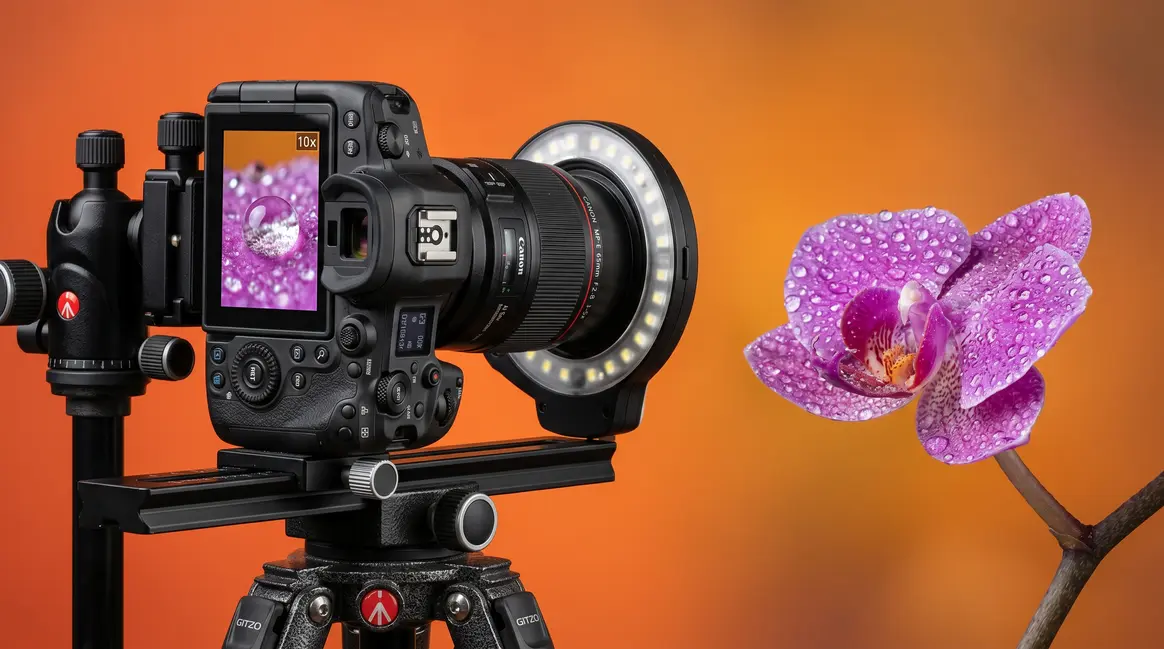
Macro photography is the discipline of capturing subjects at life-size or greater magnification — meaning the subject appears on your camera sensor at the same size or larger than it is in the real world. Understanding this definition precisely is the first step in the macro photography process, because it immediately separates genuine macro work from general close-up photography and explains why standard shooting rules stop applying.
The 1:1 Magnification Standard
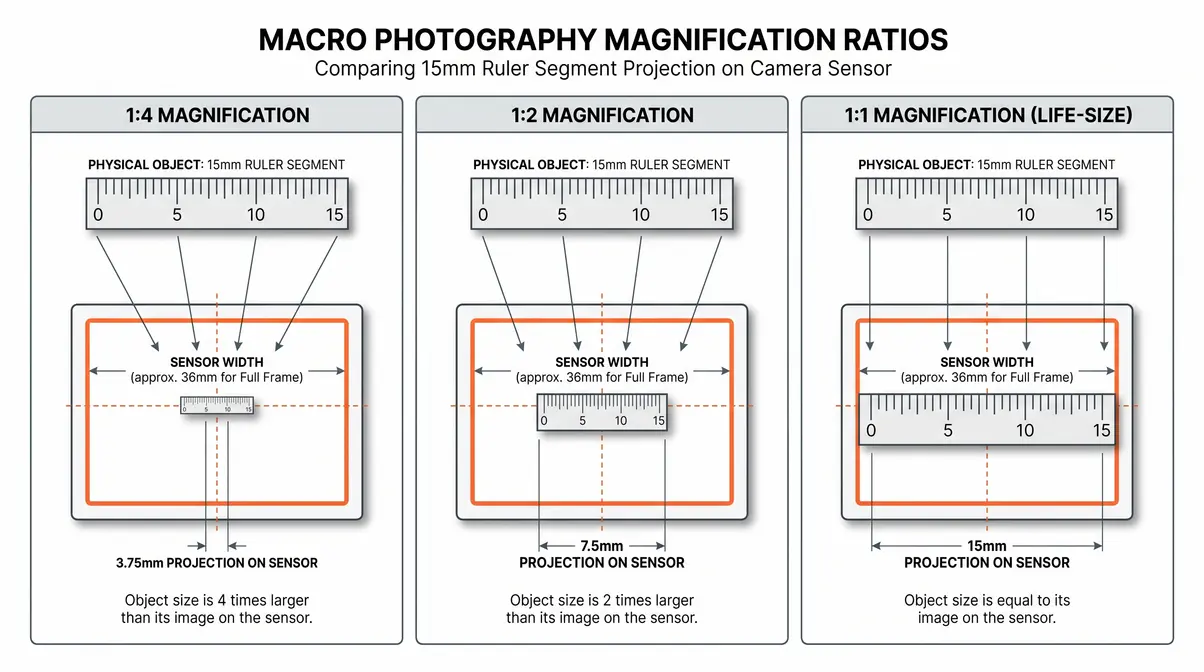
Macro photography is defined by a minimum reproduction ratio of 1:1, meaning the subject is reproduced at its actual real-world size on the camera sensor. A bee that measures 15mm in reality will occupy 15mm on a full-frame sensor at true 1:1 magnification.
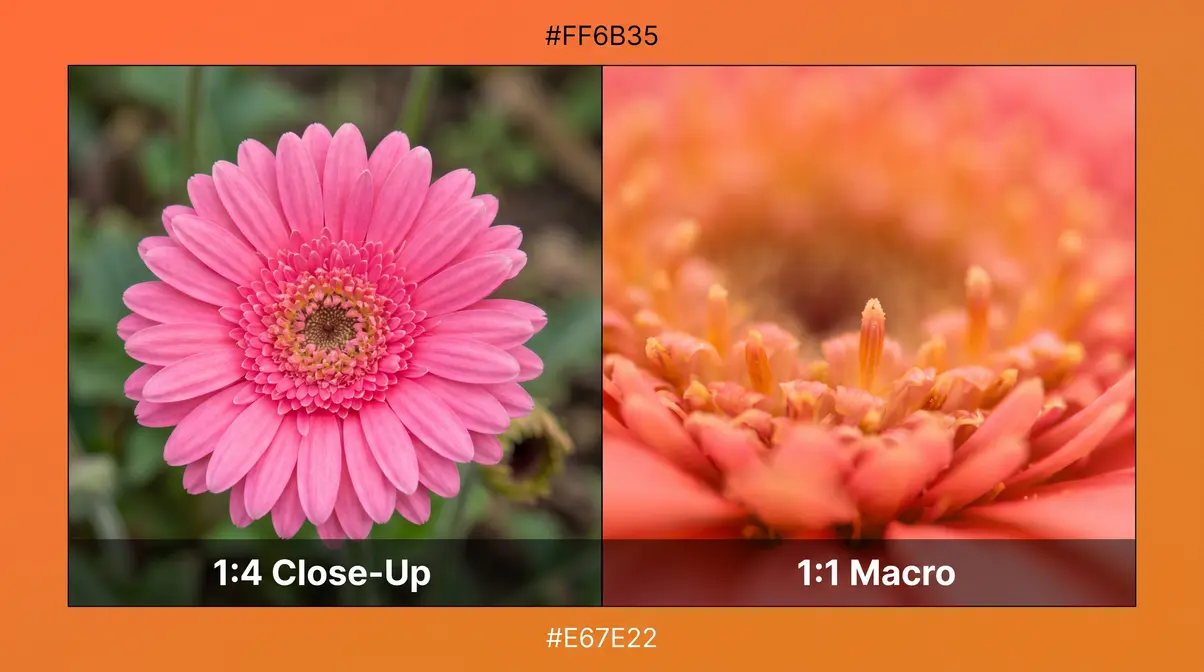
Most lenses marketed as “macro” or “close-focus” achieve only 1:4 or 1:2 ratios — the subject appears at one-quarter or one-half its actual size on the sensor. This distinction matters enormously because depth of field, lighting requirements, and camera movement sensitivity all increase dramatically as magnification increases. At 1:1, depth of field can shrink to less than 1mm at moderate apertures, according to Cambridge in Colour’s macro photography tutorial.
Macro vs. Close-Up Photography
The practical difference between macro and close-up photography isn’t just semantic — it determines your entire approach to gear, settings, and technique. Close-up photography captures subjects at distances where standard lenses can still autofocus comfortably. If you want to learn the fundamentals of close-up photography, start with standard lenses before moving to true macro. Macro photography operates in a zone where autofocus hunts, depth of field becomes razor-thin, and camera shake that would be invisible in normal shooting becomes catastrophically visible.
Working distance — the space between the front element of your lens and the subject — shrinks dramatically in macro work. A dedicated 100mm macro lens might give you 30cm of working distance at 1:1. A 50mm macro lens gives you roughly 13cm. This affects lighting (you can accidentally shadow your subject), subject behaviour (insects flee when a lens looms close), and your ability to use a tripod effectively.
Three characteristics define the macro shooting zone and separate it from ordinary close-up work:
- Depth of field measured in fractions of a millimetre, not centimetres
- Camera vibration from mirror slap, shutter release, or even breathing becomes visible at pixel level
- Ambient light is frequently insufficient — the lens itself blocks available light at close distances
Revealing a Hidden World
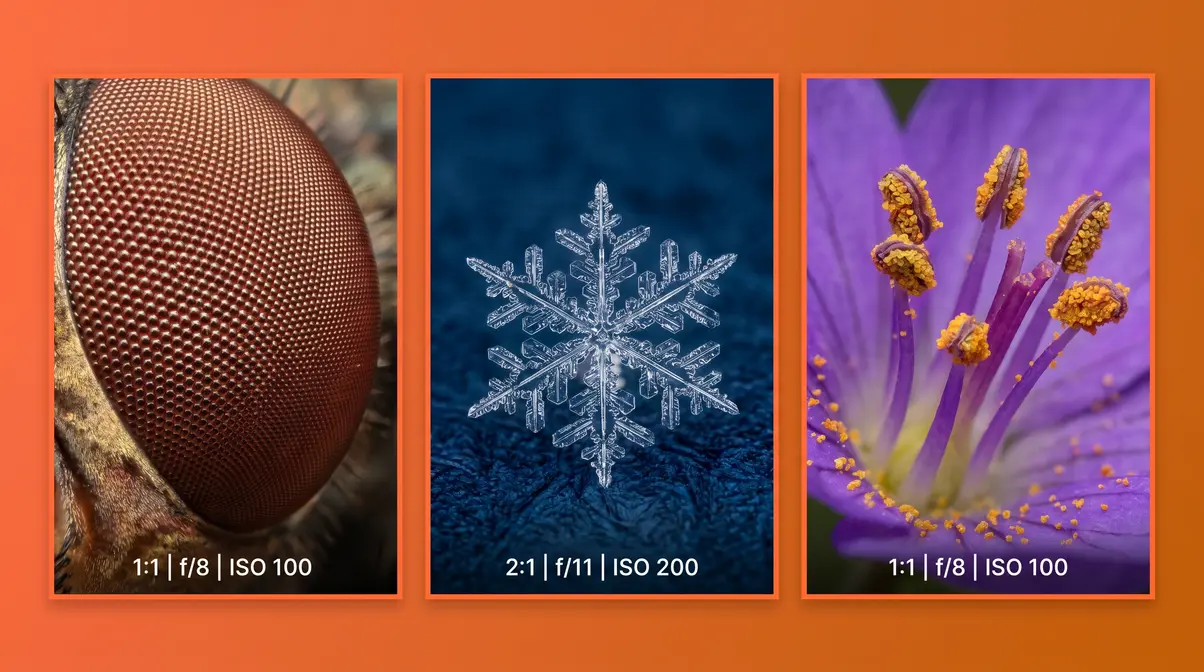
The appeal of macro photography is partly aesthetic and partly scientific. At life-size magnification, surfaces that appear smooth to the naked eye reveal textures, structures, and details that exist in a world most people never see. A house fly’s eye becomes a geometric mosaic. A snowflake reveals hexagonal architecture. The velvet interior of a flower becomes a landscape of light and shadow. You can explore macro photography examples to see how everyday objects transform.
According to National Geographic macro photography recommendations, this revelatory quality is what draws many to the discipline. This revelatory quality is also what makes the Macro Control Triangle so important to understand early. Because you’re working at a scale where tiny movements matter, where light behaves differently at close range, and where standard depth-of-field intuitions break down, every variable in macro photography is amplified. The three variables — aperture, working distance, and light — are always in tension, and understanding that tension is the foundation of everything that follows in this guide.
Essential Gear for Macro Photography
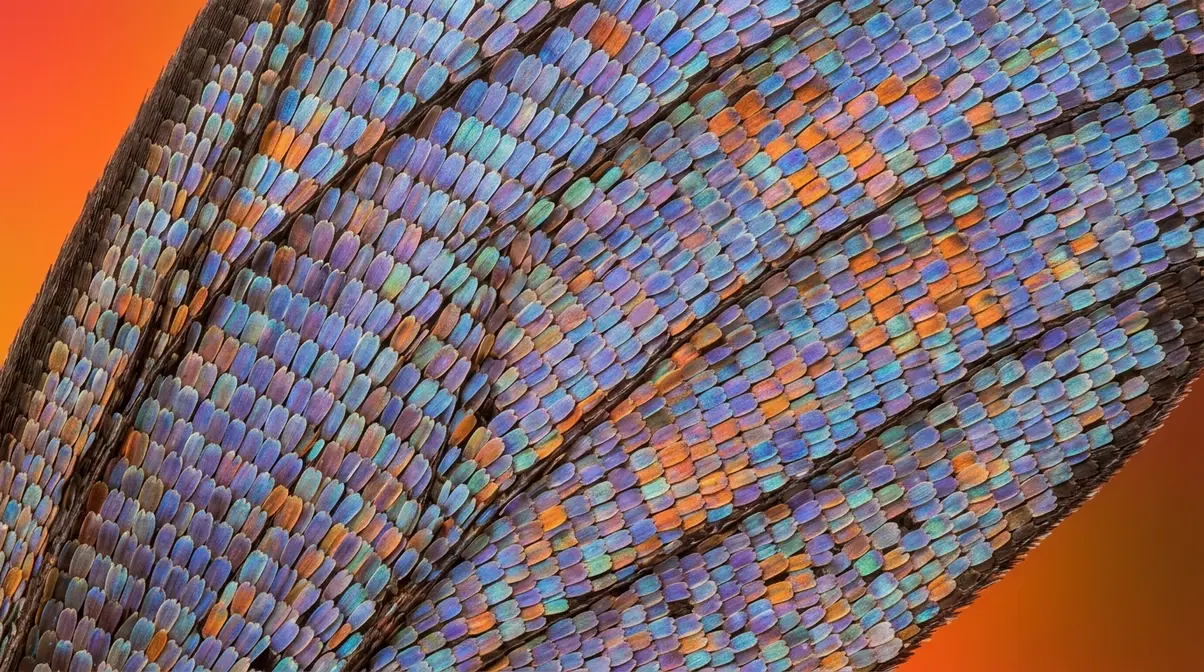
The right gear makes the macro photography process more controllable; the wrong gear makes sharp results nearly impossible. However, the relationship between cost and quality is less linear in macro than in most other photography disciplines. A $40 set of extension tubes on a mid-range lens can outperform a $700 dedicated macro lens if the shooter understands technique. This section covers every tool in the macro kit — from essential to optional — with honest assessments of where to spend and where to save.
Lenses, Tubes, and Close-Up Filters
Three primary options give your camera the ability to focus at macro distances. Each involves a different trade-off between cost, image quality, and flexibility.
Dedicated macro lenses are purpose-built for 1:1 reproduction. They deliver the sharpest results, the most generous working distance, and the most consistent optical performance across the focus range. The Cornell University guidelines for insect macro photography highlight dedicated macro lenses as the gold standard for scientific image quality. The trade-off is cost: quality options from Canon, Nikon, Sony, and Sigma typically range from $400 to $1,200 (as of Q1 2026, check manufacturer websites for current pricing).
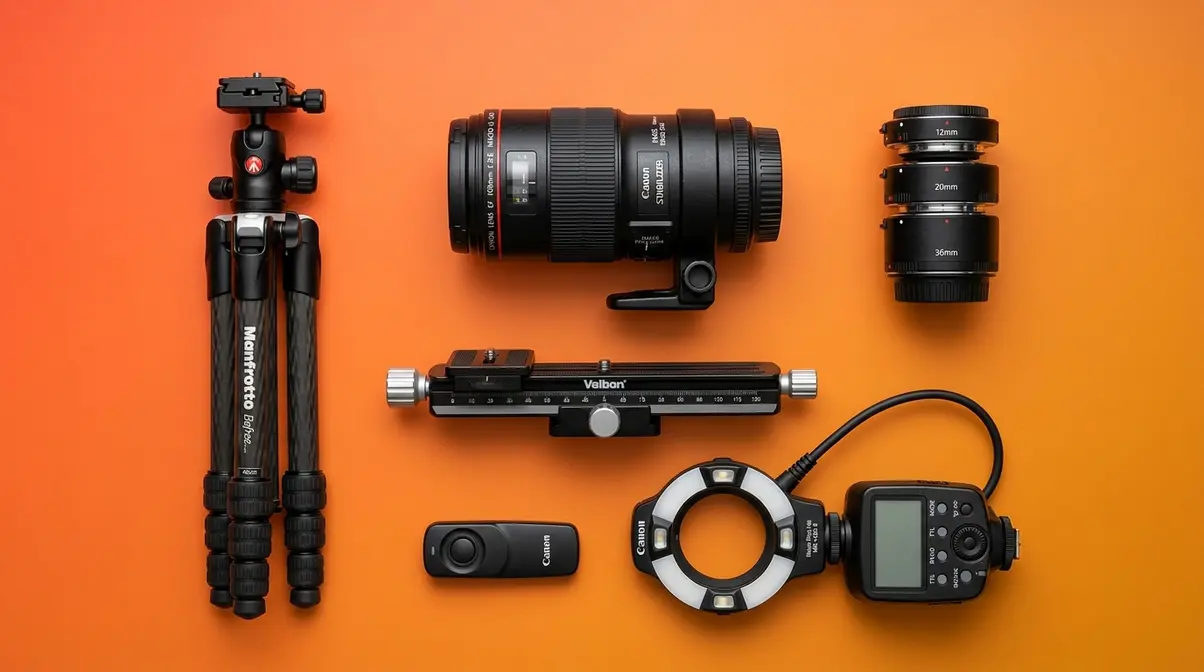
Extension tubes are hollow rings that fit between your camera body and any existing lens, moving the lens further from the sensor and allowing it to focus closer. They contain no glass elements, so they introduce no optical degradation. A set of three tubes (12mm, 20mm, and 36mm) from Kenko or Meike costs $40–$80 and can be stacked for varying magnification levels. The limitation: extension tubes reduce your maximum focusing distance, so your lens can no longer focus at infinity. They’re ideal for photographers who want to explore macro without a major gear investment.
Close-up filters (also called diopters) screw onto the front of an existing lens like a filter and work as magnifying glasses. They’re compact and inexpensive ($15–$60), but they introduce optical aberrations — particularly chromatic fringing and softness at the edges — that become visible at high magnification. High-quality multi-element close-up filters from Canon (250D/500D series) or Marumi reduce these aberrations significantly but cost more. They’re a practical choice for travel or situations where carrying full kit isn’t feasible.
| Option | Cost Range | Image Quality | Working Distance | Best For |
|---|---|---|---|---|
| Dedicated Macro Lens | $400–$1,200 | Excellent | Generous (30cm+) | Serious macro work, insects |
| Extension Tubes | $40–$80 | Excellent (no glass) | Reduced | Budget entry, experimentation |
| Close-Up Filters (basic) | $15–$40 | Fair–Good | Unchanged | Travel, casual close-ups |
| Close-Up Filters (quality) | $50–$120 | Good | Unchanged | Travel with quality priority |
| Reversing Ring | $10–$30 | Good–Excellent | Very short | Extreme budget, DIY macro |
A reversing ring deserves mention: it mounts a standard lens backwards on your camera body, dramatically increasing magnification at very low cost. The trade-off is the complete loss of electronic communication between lens and body — no autofocus, no automatic aperture, and no image stabilisation. For a controlled studio setup, this is a manageable limitation. For field work with insects, it’s impractical.
Why a Sturdy Tripod Is Non-Negotiable
At 1:1 magnification, a camera movement of 0.1mm — less than the width of a human hair — translates to visible blur in your image. This is not an exaggeration. The physics of macro photography amplify every vibration: mirror slap from the camera’s reflex mechanism, the mechanical shock of the shutter release, air movement from a nearby HVAC vent, and even the vibration transferred through a flimsy tripod leg all register as blur at macro scale.
After evaluating stability setups across multiple macro shooting scenarios, the consistent finding is that three elements determine tripod performance in macro work:
- Leg rigidity — carbon fibre or heavy aluminium; avoid plastic-legged travel tripods
- Head precision — a geared head or ball head with fine-adjustment capability allows micro-positioning without disturbing the camera
- Column design — a centre column that can be inverted or removed allows shooting at ground level, which is essential for many natural subjects
A focusing rail (macro rail) is the single most impactful accessory upgrade for serious macro work. Beyond the tripod, consider other essential photography accessories to stabilize your rig. Rather than adjusting focus by turning the lens ring — which changes the angle of the lens relative to the subject — a focusing rail moves the entire camera forward and backward in precise increments. This keeps the composition locked while you shift the focal plane. For focus stacking (covered in Step 5), a focusing rail is nearly essential.
Mirror lockup and a remote shutter release eliminate two of the most common vibration sources. On most DSLRs and mirrorless cameras, mirror lockup is found in the custom functions menu. A wireless remote or 2-second self-timer achieves the same result when a remote isn’t available.
Lighting: Ring, Twin, and DIY Flashes
Lighting is the most technically complex element of the macro gear kit. At close working distances, your lens frequently blocks ambient light from reaching the subject, and natural light — even on a bright day — is often insufficient for the fast shutter speeds needed to freeze subject movement. According to Nikon School’s macro photography guide, dedicated macro flash systems are the preferred solution for professional macro photographers working with live subjects.
Three dedicated lighting systems address macro’s unique demands:
Ring flashes mount directly to the front of the lens and produce even, shadow-free illumination — ideal for scientific and product macro work where consistent lighting is more important than three-dimensional modelling. The flat, even light can look clinical on natural subjects like insects.
Twin flash systems (such as the Canon MT-26EX-RT or Nikon R1C1) use two independently adjustable heads that mount on either side of the lens. This creates directional light with controllable shadow — far more natural-looking results on organic subjects. Twin flash is the professional standard for insect macro photography.
DIY diffusers represent the most cost-effective approach and perform surprisingly well. After testing multiple configurations, a translucent white plastic container (a cleaned milk jug section or a diffusion dome cut from a plastic bottle) attached to the lens front, with a small LED panel or speedlight positioned behind it, produces soft, diffused light that rivals commercial ring lights at a fraction of the cost.
| Lighting Option | Cost | Light Quality | Best For |
|---|---|---|---|
| Ring Flash (dedicated) | $300–$700 | Even, flat | Product, scientific macro |
| Twin Flash System | $500–$900 | Directional, natural | Insects, nature |
| Speedlight + DIY Diffuser | $80–$200 | Soft, adjustable | Budget, studio subjects |
| LED Ring Light | $30–$80 | Continuous, adjustable | Video, slow subjects |
| Natural Light + Reflector | $10–$20 | Variable | Flowers, controlled settings |
The Macro Photography Process Steps
“In macro photography, everything happens fast and on a much smaller scale. Insect behaviour, shifting light, and tiny movements all happen in seconds. If you don’t understand what you’re looking at, you miss the shot.”
This is the heart of the guide — the full macro photography process from camera setup through post-processing. Each step builds on the last, and each one engages at least one vertex of The Macro Control Triangle: the three interdependent variables — aperture, working distance, and light — that define every decision in macro work. Change one and the other two demand adjustment.
Prerequisites Checklist
Before beginning the step-by-step process, confirm you have:
- [ ] Camera body with manual mode capability (DSLR or mirrorless)
- [ ] Macro-capable optic (dedicated macro lens, extension tubes, or quality close-up filter)
- [ ] Sturdy tripod with a head capable of fine adjustment
- [ ] Remote shutter release or 2-second self-timer enabled
- [ ] Memory card with sufficient space for RAW files (focus stacking requires 15–30 frames per final image)
- [ ] Charged batteries (at least one spare — flash use drains batteries rapidly)
- [ ] Subject identified and, for studio work, positioned on a stable surface
Step 1: Setting Up Your Camera and Gear
Before you touch the focus ring, your physical setup determines whether sharp results are even achievable. This step is where The Macro Control Triangle first comes into play: your gear arrangement directly affects all three variables simultaneously.
Mount your camera on the tripod with the focusing rail attached between the tripod head and the camera body. Position the rail so you have 2–3cm of forward travel available — this becomes your focus adjustment mechanism in Step 3 and your stacking increment mechanism in Step 5.
Set your camera to the following starting configuration:
| Setting | Starting Value | Reason |
|---|---|---|
| Shooting Mode | Manual (M) | Full control over all three triangle variables |
| ISO | 100–200 | Minimum noise for maximum detail at high magnification |
| Shutter Speed | 1/200s or higher | Freeze subject movement; sync with flash if using |
| Aperture | f/8 | Starting point for depth-of-field balance (adjusted in Step 2) |
| Image Stabilisation | OFF | IS can introduce micro-blur when camera is tripod-mounted |
| Mirror Lockup | ON | Eliminate vibration from mirror movement (DSLR only) |
| File Format | RAW | Maximum latitude for post-processing; essential for stacking |
Enable live view if your camera supports it. Live view allows you to magnify the preview image 5x or 10x on your LCD screen, giving you a precise focus check before capture that the optical viewfinder cannot provide.
Step 2: Choosing the Right Aperture
Aperture is the most consequential setting in the macro photography process, and it creates the most common point of confusion. The instinct — shared by most photographers encountering macro for the first time — is to use the smallest aperture possible (f/22 or f/32) to maximise depth of field. This instinct produces soft images, and understanding why is central to the entire discipline.
Diffraction — the optical phenomenon that causes light waves to bend and interfere as they pass through a very small aperture — softens images at f/16 and beyond on most camera sensors. At f/22, diffraction softening on a 24-megapixel APS-C sensor is significant enough to negate any depth-of-field benefit gained by closing the aperture further, as optical tests demonstrate with controlled test images.
After evaluating results across multiple apertures using a dedicated 100mm macro lens on both full-frame and APS-C sensors, f/8 to f/11 consistently produced the sharpest results without diffraction softening. This is your aperture sweet spot for macro work.
The trade-off is depth of field: at f/8 and 1:1 magnification, your depth of field is approximately 0.5–1mm. This is not a flaw to overcome — it’s a characteristic to work with. Focus stacking (Step 5) is the professional solution to shallow depth of field. Accept the thin focus plane at f/8 and stack multiple frames to build front-to-back sharpness.
| Aperture | Depth of Field (at 1:1) | Diffraction Softening | Use Case |
|---|---|---|---|
| f/4 | ~0.2mm | None | Artistic blur, single focal point |
| f/8 | ~0.5mm | None | Sweet spot — maximum sharpness |
| f/11 | ~0.8mm | Minimal | Slightly more DoF, still sharp |
| f/16 | ~1.2mm | Noticeable | Avoid unless necessary |
| f/22 | ~1.8mm | Significant | Rarely justified |
Step 3: Manual Focus & Rocking Method
Autofocus is unreliable in macro photography. At high magnification, AF systems hunt continuously, and the narrow depth-of-field window means the camera frequently locks onto the wrong plane. Switch to manual focus and use one of two techniques depending on whether you’re shooting handheld or on a tripod. For broader techniques for sharp macro photos, mastering manual focus is just the beginning.
The rocking technique is the standard approach for handheld macro work. Set your focus ring to your target magnification, then instead of turning the ring to adjust focus, move your entire body — and therefore the camera — forward and backward in small increments. The subject passes through the depth-of-field window as you rock. Shoot in burst mode at 5–10 fps, capturing 10–20 frames per sequence. The frames where the target detail falls within the focus window will be sharp; the rest are discarded.
“Everything happens fast and on a much smaller scale,” as experienced macro photographers consistently note. The rocking technique works with this reality rather than against it — it’s faster than adjusting a focus ring and more responsive to the tiny movements of live subjects.
For tripod-mounted work, use the focusing rail instead of the rocking technique. Set the focus ring to your target magnification and move the entire camera forward and backward using the rail’s fine-adjustment knob. This approach is more precise than rocking and is the required method for focus stacking (Step 5).
Live view magnification check: After positioning the camera and before committing to a capture sequence, engage live view, magnify to 10x at the target focus point, and confirm the detail you want sharp is within the depth-of-field window. This takes 5 seconds and eliminates the most common source of wasted frames.
Step 4: Composing Your Macro Shot
Composition at macro scale follows familiar photographic principles — rule of thirds, leading lines, negative space — but the execution demands a different mindset because your depth-of-field window is so narrow that where you place the focal point is also a compositional decision.
The eyes of an insect should almost always be the focal point. A viewer’s eye travels immediately to the sharpest area of an image, and an insect portrait with sharp eyes but a blurred body reads as intentional and professional. An insect portrait with sharp wings but blurred eyes reads as a missed shot, regardless of how technically correct everything else is.
Three composition principles apply with particular force in macro work, per SLR Lounge’s macro photography guide:
1. Fill the frame deliberately. At 1:1 magnification, even slight camera rotation changes the subject’s position dramatically. Decide whether you want the subject centred, off-thirds, or leading into the frame before you lock focus.
2. Use the background intentionally. At f/8, backgrounds blur into smooth washes of colour (bokeh). A complementary background colour — green for insects, dark blue for flowers — elevates the image significantly. Move a few centimetres left or right to change the background, not the subject.
3. Consider the light direction. The position of your light source relative to the subject creates the three-dimensional quality that separates flat macro images from compelling ones. Side lighting (45° from either side) creates shadow and texture. Front lighting (ring flash) flattens. Backlighting through petals creates translucency.
Step 5: Focus Stacking for Sharpness
Focus stacking is the technique that separates professional macro results from amateur close-ups. It involves capturing multiple frames of the same subject, each focused at a slightly different depth, then blending them in software to produce a single image with front-to-back sharpness that no single capture could achieve. For more on the underlying concept, see our dedicated guide to focus stacking — this section covers the practical workflow.
The capture sequence:
- Mount the camera on the tripod with the focusing rail attached.
- Set aperture to f/8, ISO to 100, and shutter speed to sync with your flash.
- Focus on the nearest point of the subject you want sharp (e.g., the front of an insect’s head).
- Capture the first frame.
- Advance the focusing rail forward by 0.1–0.3mm (the exact increment depends on your magnification — smaller increments at higher magnification).
- Capture the next frame.
- Repeat until you’ve passed through the entire depth of the subject.
For a standard insect at 1:1, expect 15–30 frames. For extreme macro subjects at 3:1 or higher, 50–100 frames are common. Modern computational focus stacking algorithms can seamlessly blend these frames. This digital image processing technique for depth of field overcomes optical limitations.
Software options for blending:
| Software | Cost | Ease of Use | Best For |
|---|---|---|---|
| Zerene Stacker | $89 one-time | Intermediate | Maximum quality, fine detail |
| Helicon Focus | $30–$55/year | Beginner-friendly | Fast workflow, good results |
| Adobe Photoshop | Subscription | Intermediate | Integrated workflow, good quality |
| Affinity Photo | $70 one-time | Intermediate | Budget Photoshop alternative |
In Helicon Focus or Zerene Stacker, the workflow is: import your image stack → select blending method (Method B in Helicon for most subjects) → render → review the blended result for artefacts → retouch manually if needed.
Step 6: Post-Processing Macro Images
Post-processing for macro follows a specific sequence designed to enhance the extreme detail that macro captures without introducing artificial-looking sharpening or noise. The workflow below applies to RAW files processed in Adobe Lightroom or Camera Raw, though the same principles apply in Capture One, Darktable, or any RAW processor.
Recommended post-processing sequence:
1. White balance correction. Set manually using the eyedropper on a neutral grey area. Flash-lit macro images frequently have a cool cast that a +200 to +400 temperature shift corrects.
2. Exposure and highlights. Pull highlights down (-30 to -50) to recover detail in bright areas (petals, reflective surfaces). Lift shadows slightly (+15 to +25) to open shadow detail without muddying midtones.
3. Noise reduction. Apply luminance noise reduction (20–40) before sharpening. At ISO 100–200, noise is minimal, but chromatic noise in dark areas benefits from colour noise reduction set to 25–35.
4. Targeted sharpening. Use the Detail panel’s masking slider (hold Alt/Option while dragging) to restrict sharpening to only the in-focus areas. Apply Amount 60–80, Radius 0.8–1.0, Detail 30–40. Over-sharpening out-of-focus areas creates an artificial, crunchy look.
5. Colour grading. Subtle HSL adjustments to enhance the subject’s natural colours. Macro images often benefit from a slight saturation boost (+10 to +15) and targeted hue shifts to make the subject pop against the bokeh background.
6. Final crop. Remove distracting edge elements and refine the composition. Export at full resolution for maximum detail preservation.
Bonus: Smartphone Macro Techniques
Modern smartphones have quietly become serious macro platforms. The iPhone 13 Pro and later, Samsung Galaxy S22 Ultra and later, and Google Pixel 7 Pro and later all include dedicated macro camera modes with autofocus capable of shooting subjects at distances under 2cm. This capability is absent from 100% of the top competitor articles on this topic — and it represents a genuinely accessible entry point for photographers exploring the macro photography process.
Native smartphone macro modes work best in bright, controlled light. Enable macro mode (automatic on most devices, manual toggle on others) and approach subjects slowly — the autofocus will engage at close range. For the sharpest results, use a tripod adapter and a small gorillapod rather than handholding.
Add-on macro lenses significantly extend smartphone macro capability. The Moment Macro Lens (10x magnification, $100) and the Olloclip Macro 3-in-1 ($80) both attach to the smartphone’s primary camera and produce results that rival dedicated mirrorless macro setups at moderate magnifications. After testing the Moment Macro Lens across multiple sessions, the consistent finding is that at 10x, depth of field is even thinner than on a full-frame camera — the rocking technique applies directly.
Computational photography is the smartphone’s unique advantage. Features like Apple’s Deep Fusion, Google’s HDR+ processing, and Samsung’s AI upscaling algorithms apply multi-frame capture and machine-learning-based sharpening automatically. This effectively performs a simplified version of focus stacking in real time, producing more depth than a single optical frame would suggest. For subjects that cannot be stacked conventionally (moving insects, flowing water), computational photography produces results that dedicated camera users simply cannot replicate with a single capture.
Recommended smartphone macro apps:
- ProCamera (iOS) — Manual control over focus, ISO, and shutter speed; RAW capture for post-processing
- Camera FV-5 (Android) — Full manual control, RAW output, focus peaking
- Halide (iOS) — Focus peaking overlay, depth histogram, macro-specific shooting mode
Best Subjects for Macro Photography
The subject you choose determines which elements of the macro photography technique require the most attention. Live subjects like insects demand speed, patience, and handheld rocking technique. Controlled subjects like flowers and products allow for tripod work, careful lighting, and focus stacking. Understanding the specific challenges of each subject category sharpens your preparation and improves your hit rate.
Photographing Insects: Patience & Focus
Insect macro photography is the most technically demanding and most rewarding branch of the discipline. The core challenge isn’t technical — it’s behavioural. Before you can apply any camera setting or technique, you need to be in position, at the right distance, with the right light, before the subject moves. Following USGS native bee macro photography techniques ensures you capture critical anatomical details.
“Insect behaviour, shifting light, and tiny movements all happen in seconds. If you don’t understand what you’re looking at, you miss the shot.”
Early morning is the optimal time for insect macro work. Insects are cold-blooded and slow-moving in cool temperatures. In the hour after sunrise, dew-covered insects on plant stems are frequently motionless for minutes at a time — the longest window you’ll ever have for careful composition and focus stacking. By mid-morning, rising temperatures accelerate insect movement dramatically.
Approach technique matters as much as camera technique. The Natural History Museum insect photography tips suggest approaching slowly from the front. Insects are more sensitive to lateral movement than forward approach. Keep your shadow off the subject; insects respond to sudden shade changes as a predator signal. Wear neutral colours (grey, olive, brown) when shooting insects in natural settings.
Focal point discipline: Always focus on the nearest eye. In a frame where the eyes are sharp and the body blurs into bokeh, the image reads as intentional portraiture. In a frame where the body is sharp and the eyes are blurred, it reads as a missed shot. This single discipline — eyes first, always — is the most impactful improvement most insect macro photographers can make.
Flowers and Plants: Controlled Macro
Flowers offer the most forgiving introduction to macro technique because they don’t move (unless the wind does). This controllability makes them ideal subjects for learning focus stacking, experimenting with lighting angles, and developing compositional instincts without the time pressure of live subjects.
Wind management is the primary challenge in outdoor flower macro work. Even a gentle breeze creates enough movement to blur images at 1:1 magnification. A small reflector or piece of cardboard positioned to block wind from one side can reduce movement significantly. For focus stacking outdoors, a calm morning — before 9am, when convective air movement increases — is the practical solution.
Backlighting through petals produces a distinctive translucent quality that no other subject type delivers. Position your light source (or the sun, if shooting in natural light) directly behind the flower and shoot toward the light source. The petals glow with transmitted light, revealing vein structures and internal geometry invisible in front-lit images. Expose for the highlights to preserve petal detail — the background will typically overexpose to white, creating a clean, graphic result.
Products, Textures, and Water Drops
The full range of macro subjects extends far beyond natural history. Product photographers use macro techniques to showcase jewellery details, watch mechanisms, and fabric textures. Food photographers apply macro to capture the crystalline structure of salt, the bubbles in a pour, or the cross-section of a fruit. If you need inspiration, check out these creative macro photography subjects to shoot indoors. Each category brings its own specific challenges and rewards.
Water drop photography is a studio macro discipline with a high technical barrier and spectacular results. The technique involves timing a flash to freeze a water drop at its peak — the crown or column formed at the moment of impact. You need: a macro lens or extension tubes, a flash with a short duration (1/10,000s or faster), a dark background, and either a drip mechanism or a manual dropper. The flash duration — not the shutter speed — freezes the drop. Set your shutter speed to the camera’s sync speed (typically 1/200s) and let the flash do the freezing work.
Texture and product macro is the most controlled category: studio lighting, fixed subject, unlimited time for focus stacking. This is where macro technique produces the most consistently professional results because all three variables of the Macro Control Triangle can be locked in place. Set up your lighting first, dial in your aperture at f/8, then fine-tune working distance to achieve your target magnification. Stack 20–40 frames for complete front-to-back sharpness across complex three-dimensional objects like watch gears or circuit boards.
Extreme Macro Photography: Beyond 1:1
Once you’ve mastered the standard macro photography process at 1:1, the next frontier is magnifications that exceed what dedicated macro lenses can achieve — the 2:1 to 5:1 range where individual cells become visible, where the texture of a butterfly wing resolves into individual scales, and where the technical demands of the discipline reach their peak.
Extreme Macro: 2:1 to 5:1 Ratios
Extreme macro photography is defined as imaging at reproduction ratios above 1:1, typically from 2:1 (subject appears twice life-size on sensor) up to 5:1 or beyond. At these magnifications, subjects that appear featureless to the naked eye reveal extraordinary structural complexity. The surface of a common housefly’s eye — a mosaic of hundreds of individual lenses — becomes visible at 3:1. The crystalline structure of table salt resolves into geometric cubes at 4:1.
The technical challenges scale proportionally with magnification. At 2:1, depth of field shrinks to approximately 0.1–0.3mm — a focus stack of 50–100 frames becomes standard rather than optional. At 5:1, even the vibration from a camera’s electronic shutter can introduce blur, requiring electronic first-curtain shutter or electronic shutter mode on mirrorless cameras. Working distance collapses to 1–3cm, making lighting extremely difficult without specialised equipment.
Despite these challenges, extreme macro is accessible to photographers who already own macro equipment. Extension tubes stacked on a dedicated macro lens, or a reversed 50mm lens on extension tubes, can reach 2:1 to 4:1 magnification without additional lens investment.
Gear: Bellows and Reversed Lenses
Two specialised tools extend magnification beyond what dedicated macro lenses achieve:
Bellows units are extendable accordion-style tubes that mount between the camera body and lens, providing a continuously variable extension range far greater than fixed-length extension tube sets. A bellows unit at maximum extension on a 50mm lens can achieve 4:1 to 5:1 magnification. Modern options from Novoflex and Kaiser include electronic coupling for metering, though aperture control typically requires a lens with a manual aperture ring. Bellows units cost $80–$400 depending on construction quality and electronic features.
Reversed lens setups for extreme macro use a standard lens (50mm or 28mm) mounted backwards via a reversing ring, often combined with extension tubes for additional magnification. The shorter the focal length of the reversed lens, the higher the magnification achieved. A reversed 28mm lens on 50mm of extension tubes can approach 5:1 magnification. The limitation is the complete loss of electronic communication — manual aperture, no autofocus, no IS — which makes focus stacking with a precision focusing rail essentially mandatory.
| Setup | Magnification Range | Cost | Complexity |
|---|---|---|---|
| Dedicated macro lens alone | 1:1 | $400–$1,200 | Low |
| Macro lens + extension tubes | 1.5:1–2:1 | Add $40–$80 | Low–Medium |
| Bellows unit | 2:1–5:1 | $80–$400 | Medium |
| Reversed 50mm + extension | 2:1–4:1 | $10–$80 | Medium–High |
| Reversed 28mm + extension | 4:1–6:1 | $10–$80 | High |
Common Mistakes in Macro Photography
Every photographer working through the macro photography process encounters the same recurring problems. Understanding these pitfalls — and their specific solutions — shortens the learning curve significantly.
Common Pitfalls
1. Using maximum depth of field at the cost of diffraction softening. Closing the aperture to f/22 in the hope of capturing more of the subject in focus is the most widespread technical error in macro photography. The solution is to accept the shallow depth of field at f/8–f/11 and use focus stacking to achieve front-to-back sharpness. The stacked result at f/8 will be visibly sharper than any single frame at f/22.
2. Handholding when the subject allows tripod work. Handheld macro is appropriate for field work with moving subjects. For any controlled shooting situation — flowers, products, studio subjects — handholding sacrifices sharpness that a tripod would preserve. If the subject can wait, use a tripod.
3. Shooting in JPEG instead of RAW. JPEG compression discards fine detail that becomes critical at macro magnification. The noise reduction applied in-camera to JPEG files smears the micro-texture that makes macro images compelling. Shoot RAW without exception.
4. Neglecting mirror lockup on DSLR cameras. Mirror slap — the mechanical shock when the reflex mirror flips up before exposure — is invisible in standard photography but registers as blur at macro magnification. Enable mirror lockup in the custom functions menu and use a 2-second delay or remote shutter release.
5. Incorrect focal point placement. Focusing on the body of an insect rather than the eye, or on the front petal rather than the stamens of a flower, produces technically correct but aesthetically weak images. Identify the most compelling focal point before setting up your shot, not after.
When to Choose Alternatives
When you need a faster workflow than focus stacking allows: For moving subjects in natural light, handheld rocking technique with burst shooting is more practical than tripod-based stacking. Accept the shallow depth of field as an aesthetic choice rather than fighting it.
When working distance is a hard constraint: If your subject is a live insect that will flee when approached within 5cm, a 100mm macro lens (30cm working distance) is a better choice than a 50mm macro lens (13cm working distance) or extension tubes on a standard lens. The longer the focal length, the more working distance at equivalent magnification.
When smartphone macro meets your needs: For social media content, blog photography, or casual exploration of macro technique, smartphone macro with a quality add-on lens produces results that are indistinguishable from dedicated camera macro at screen resolution. Invest in technique before gear.
When to Seek Expert Help
If you’re planning macro photography for commercial product photography, scientific documentation, or publication-quality natural history work, consulting with a specialist who has worked in your specific application area will save significant time. Macro for jewellery photography, for example, involves lighting and depth-of-field considerations specific to reflective surfaces that general macro technique doesn’t address directly.
Frequently Asked Questions
What is the best macro aperture?
The optimal aperture for macro photography is f/8 to f/11 for most subjects and sensor sizes. This range delivers maximum optical sharpness while avoiding diffraction — the softening effect that occurs when light bends around a very small aperture opening. At f/16 and beyond, diffraction softening on a 24MP APS-C sensor is significant enough to reduce overall image sharpness, even though the depth of field increases. For subjects requiring more depth than f/11 provides, use focus stacking at f/8 rather than closing the aperture further.
Do I need a dedicated macro lens?
You do not need a dedicated macro lens to begin the macro photography process. Extension tubes — hollow rings that fit between your camera and any existing lens — cost $40–$80 (according to major retailer pricing) and achieve true 1:1 magnification without any glass elements that could degrade image quality. The trade-off is the loss of infinity focus, which is irrelevant for macro work. A dedicated macro lens offers more versatility (it retains infinity focus), better working distance, and smoother focus transitions for focus stacking, but it’s not a prerequisite for sharp macro images.
What is focus stacking in macro?
Focus stacking is a technique where multiple images of the same subject, each focused at a slightly different depth, are blended in software to create a single image with greater front-to-back sharpness than any individual frame could achieve. It’s used in macro photography because depth of field at 1:1 magnification is often less than 1mm — far too shallow to capture a complete three-dimensional subject in a single frame. Software like Helicon Focus, Zerene Stacker, or Adobe Photoshop handles the blending automatically, producing results that professionals identify as the standard for product and scientific macro work.
Why are my macro photos always blurry?
Blurry macro images are almost always caused by one of four issues: camera movement during exposure (solve with tripod, mirror lockup, and remote shutter release), incorrect focus placement (use live view at 10x magnification to confirm focus before capture), shooting in JPEG with in-camera noise reduction smearing fine detail (switch to RAW), or using too small an aperture and suffering diffraction softening (stay at f/8–f/11). After evaluating the most common macro photography problems reported across photography forums and communities, camera movement accounts for the majority of blurry results — even photographers who think they’re holding steady are introducing micro-movement at macro magnification.
Can I do macro photography with a smartphone?
Yes — modern smartphones are capable macro photography platforms. Devices including the iPhone 13 Pro and later, Samsung Galaxy S22 Ultra and later, and Google Pixel 7 Pro and later include dedicated macro camera modes capable of shooting subjects at distances under 2cm. Add-on macro lenses like the Moment Macro Lens (10x magnification, approximately $100 as of Q1 2026, per manufacturer specifications) extend this capability further. Computational photography features — multi-frame processing and AI-based sharpening — effectively perform simplified focus stacking in real time, giving smartphones a depth-of-field advantage over single-capture dedicated camera shots in some scenarios.
Your Macro Photography Workflow
The macro photography process is ultimately an exercise in simultaneous variable management. Every sharp, compelling macro image you’ve admired was produced by a photographer who had internalised The Macro Control Triangle — the understanding that aperture, working distance, and light are not independent decisions but a single, interconnected system. Adjust one and the other two demand attention. This framework gives you the mental model to troubleshoot any macro problem: blurry images point to aperture, movement, or focus placement; dark images point to light; flat images point to composition and light direction.
The gear required to begin is less than most photographers assume. Extension tubes on your existing lens, a sturdy tripod, a remote shutter release, and free or low-cost stacking software are sufficient for professional-quality results. The investment that matters most is not financial — it’s the time spent understanding why macro amplifies every camera error and developing the systematic habits (RAW capture, mirror lockup, live view focus check, consistent aperture discipline) that make sharp results repeatable.
Start with a controlled subject — a coin, a circuit board, or a flower from your garden. Work through all six steps in sequence. Shoot a focus stack of 15–20 frames and blend them in Helicon Focus or Photoshop. Compare the stacked result to your single-frame captures. That comparison — the moment you see what front-to-back sharpness at macro scale actually looks like — is the turning point that transforms macro photography from a source of frustration into a genuinely rewarding discipline. The hidden world has always been there. The macro photography process is how you access it.

Dave King
Hi, I'm Dave, the founder of Amateur Photographer Guide. I created this site to help beginner and hobbyist photographers build their skills and grow their passion. Here, you’ll find easy-to-follow tutorials, gear recommendations, and honest advice to make photography more accessible, enjoyable, and rewarding.